Choosing aerial equipment rental software requires more than comparing booking calendars and equipment lists.
Aerial rental fleets may include scissor lifts, telescopic boom lifts, articulating boom lifts, mast lifts, vertical personnel lifts, and related attachments. Each unit may have different working heights, platform capacities, power sources, operating readings, inspection requirements, transport needs, and maintenance schedules.
The software must reflect how this equipment moves through quotations, reservations, preparation, transport, active rentals, returns, inspections, maintenance, billing, and reporting.
A general rental platform may handle customer records and invoices. However, buyers still need to confirm whether it can manage the equipment details and operational exceptions involved in aerial rentals.
Use the following criteria to evaluate each shortlisted system.
Start with Your Aerial Equipment Structure
Before comparing providers, document the equipment your company manages.
Separate the fleet into categories that employees and customers understand. Depending on the business, the structure may include equipment type, working height, platform height, horizontal reach, platform capacity, power source, terrain type, manufacturer, and model.
The system should maintain both equipment groups and individual serialized assets.
A customer may initially request an electric scissor lift with a particular platform height. The quotation can refer to that equipment class before operations assigns the individual unit closer to dispatch.
Each serialized record may include:
- Asset and serial numbers
- Make, model, and equipment category
- Working-height and capacity information
- Power source and terrain classification
- Current branch, customer site, or service location
- Operating hours or meter readings
- Current rental and maintenance status
Clear records help employees find suitable alternatives when a requested unit is unavailable.
An effective aerial equipment management software structure should also preserve the asset’s reservation, inspection, maintenance, transfer, and rental history.
Check Whether Availability Is Truly Date-Based
A lift can be inside the yard and still be unavailable.
It may already be reserved, awaiting inspection, charging, under maintenance, scheduled for transport, or missing a required component.
The system should calculate availability for the complete rental period rather than displaying only the quantity physically present.
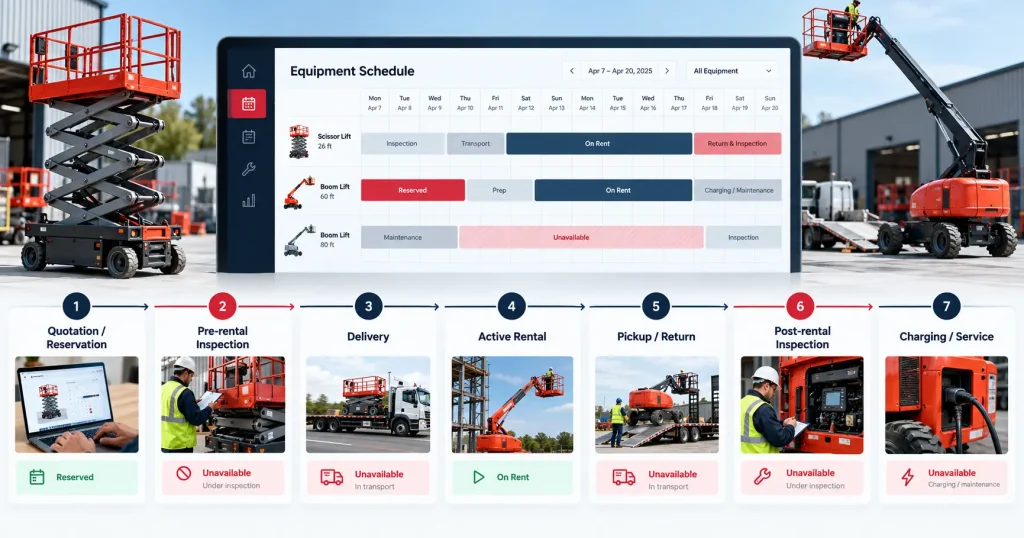
That period may include:
- Preparation and pre-rental inspection
- Delivery or customer collection
- Active rental dates
- Pickup or return transport
- Post-rental inspection
- Charging, cleaning, or service work
A connected rental scheduling system should make future reservations, expected returns, transport activity, and service restrictions visible before another order is confirmed. The published scheduling page describes separate calendar views for asset availability, transport tickets, and service jobs.
Test a rental extension during the demonstration.
If a customer keeps a boom lift for three additional days, the revised end date may overlap with another reservation, transport ticket, or maintenance requirement. The system should make that conflict visible before employees approve the extension.
Reliable equipment rental scheduling software still depends on timely updates. No platform can detect a delayed return or informal extension that employees have not recorded.
Review Equipment Assignment and Substitution
Customers may reserve an equipment category before the exact serialized unit is selected.
The software should preserve both:
- The equipment class requested by the customer
- The individual unit assigned for delivery
This allows sales teams to reserve fleet capacity while operations selects an appropriate asset based on location, condition, reading, inspection status, and future commitments.
Substitution also needs control.
If the originally assigned lift fails inspection or becomes unavailable, employees may need to assign another suitable unit. The original and replacement assets should retain separate histories.
The first unit may move into technical assessment while the replacement remains connected with the customer order.
Avoid systems that overwrite the original assignment without preserving what changed, when it changed, and why.
Examine Inspection Records Carefully
Aerial equipment inspections should remain connected with the individual asset and rental transaction.
Depending on the company’s approved process, a pre-rental record may contain equipment condition, operating readings, controls, components, visible concerns, photographs, and supporting notes.
A return inspection may identify damage, missing items, unusual readings, charging requirements, or customer-reported problems.
If equipment fails an inspection, its status should prevent another assignment until the required review, work, testing, and approval are complete.
This deserves careful attention because aerial equipment operates in environments where inspection and authorised use matter. The U.S. Centers for Disease Control and Prevention reports that 1,380 workers were injured while operating aerial or scissor lifts between 2011 and 2014. The statistic describes workplace injuries rather than software outcomes and should not be interpreted as evidence that a rental platform prevents incidents.
Software can store checklists, findings, photographs, and restrictions. It does not replace operator training, manufacturer instructions, qualified inspections, workplace assessment, or applicable procedures.
Connect Maintenance with Rental Commitments
Aerial-equipment maintenance may be triggered by calendar dates, operating hours, meter readings, inspection findings, recurring concerns, or manufacturer guidance.
The software should show upcoming, due, overdue, in-progress, awaiting-parts, testing-required, and completed service work.
Maintenance status must also affect availability.
A boom lift may appear free for a four-week rental while approaching a service threshold during the second week. The conflict should be visible before employees confirm the order.
A specialised rental equipment management system can be assessed for location, usage readings, digital inspections, maintenance history, and equipment-level reporting. These are among the functions described on the published equipment-management page.
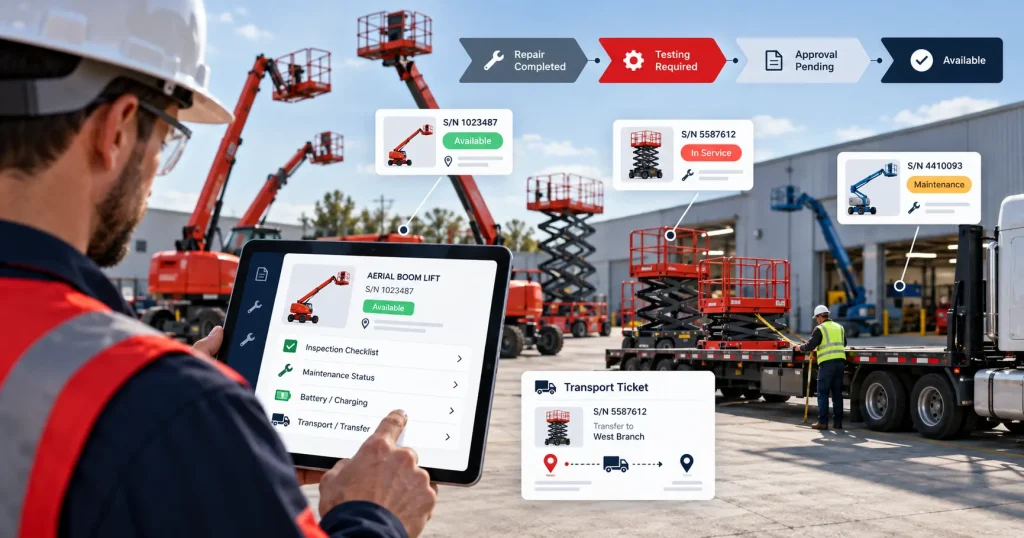
The asset should not automatically return to available status when a technician completes a repair. Testing, documentation, cleaning, charging, inspection, or final approval may remain outstanding.
Where the company’s process requires it, use separate statuses such as:
- Repair Completed → Testing Required → Approval Pending → Available
Assess Battery and Charging Visibility
Electric aerial equipment creates planning requirements that may not apply in the same way to fuel-powered assets.
A lift may return on time but remain unavailable while it charges, undergoes battery assessment, or waits for another technical check.
During the demonstration, ask how the system records:
- Power-source information
- Charging or preparation status
- Battery-related service activity
- Current equipment restriction
- Expected availability
- Repeated battery issues
The software does not need to make technical battery decisions. It should keep the relevant asset, condition, service, and availability records connected.
Charging time should also be considered when employees schedule a quick turnaround between rentals.
Test Transport and Branch Transfers
Aerial equipment often requires planned transport rather than simple customer collection.
The transport record may include the assigned unit, pickup and delivery locations, site contact, requested time, equipment dimensions, transport provider, access notes, and charge.
Separate movements may be needed for the initial delivery, an equipment exchange, interbranch transfer, partial pickup, and final collection.
If the assigned asset changes, the transport record must change as well.
For multi-location companies, equipment transfers should remain traceable through requested, approved, dispatched, in-transit, received, inspected, and available stages.
The receiving branch should not see the lift as rentable merely because a transfer has been created. Arrival and required checks must be confirmed first.
Effective aerial fleet management software should preserve branch ownership, physical location, movement history, and operational status without treating these as the same field.
Review Quotations, Pricing, and Contracts
Aerial-equipment pricing may vary by equipment class, rental duration, customer agreement, branch, transport distance, project, or additional service.
The system may need to support daily, weekly, monthly, customer-specific, and project-specific rates.
Quotations may also include:
- Delivery and collection
- Additional attachments
- Damage-waiver or insurance-related charges where applicable
- Cleaning or charging charges under approved terms
- Excess usage
- Field service
- Approved replacement or exchange costs
Employees should be able to identify which rate was used and whether a discount required approval.
Quotation revisions also need to remain visible. If the customer changes the working-height requirement, project dates, delivery address, or rental period, users should be able to identify the version that was accepted.
Once approved, the equipment requirement, customer, dates, pricing, transport, and terms should move into the rental order without duplicate entry.
Test Returns, Exchanges, and Partial Orders
A standard rental is not enough to evaluate aerial lift rental software.
Ask the provider to process common exceptions.
The customer may return one unit while keeping another. A lift may require replacement during the rental. An attachment may return separately. The customer may request an extension after the next booking has been created.
During an exchange, the original asset should retain its return date, reading, condition, reported concern, and next status. The replacement should receive its own assignment, delivery, reading, and rental history.
A partial return should close only the relevant items. The rest of the order should continue according to the approved terms.
These changes should update availability, transport, inspections, maintenance, and billing without employees correcting several disconnected records manually.
Examine Mobile and Field Workflows
Warehouse, transport, and service employees may need to update equipment records away from a desk.
Test the workflows on the actual devices the company intends to use.
Employees may need to record:
- Asset identity
- Status changes
- Meter readings
- Inspection results
- Photographs
- Delivery or collection activity
- Customer acknowledgements
- Service notes
Browser access alone does not guarantee that these tasks work well on a phone or tablet.
Also ask what happens when network access is limited. The business needs an approved process for delayed updates, manually collected information, or offline activity.
Review User Permissions and Audit History
Not every employee should be able to change every record.
Sales may need quotations, customer details, and availability. Warehouse teams may manage preparation, dispatch, and returns. Technicians may need inspections, maintenance, readings, and parts. Finance may require invoices, payment status, and account references.
Review who can:
- Change equipment availability
- Assign serialized assets
- Override pricing
- Approve discounts
- Close inspections
- Complete maintenance work
- Release equipment for another rental
- Adjust invoices
The audit history should show what changed, when it changed, and who completed the action.
Evaluate Reporting with Operational Questions
Reports should answer questions relevant to the aerial fleet.
Managers may need to identify which equipment categories experience the strongest demand, which units remain unavailable, where inspection backlogs occur, or which assets experience repeated maintenance.
Useful measures may include rental days, time utilization, financial utilization, rent-ready percentage, maintenance cost, downtime, revenue by asset, and demand by working-height category.
The report should let users move from a summary figure to the assets and transactions behind it.
High utilization may indicate strong demand, but it may also leave little time for planned maintenance. Low utilization may relate to location, pricing, condition, equipment specification, seasonal demand, or excess fleet capacity.
Reports should guide investigation rather than make purchasing or disposal decisions automatically.
Calculate the Full Implementation Cost
Software cost includes more than the subscription or licence.
The evaluation may need to cover configuration, data migration, integrations, mobile devices, labels, training, custom reports, support, and internal employee time.
Review existing equipment records before migration.
Duplicate asset numbers, inconsistent model names, incomplete serial numbers, unclear statuses, and missing maintenance histories can weaken the new system from the beginning.
Confirm which requirements are standard, configurable, integration-based, or custom.
Use a Realistic Aerial-Rental Demonstration
Ask every shortlisted provider to complete the same scenario.
Create a customer quotation for two lifts with different working heights. Add future dates, transport requirements, and individually assigned units.
Then introduce:
- A maintenance conflict
- A failed pre-rental inspection
- An equipment substitution
- A delivery change
- A partial return
- A rental extension
- An approved additional charge
- A utilization report
This demonstration will reveal more than a feature checklist.
It shows whether the platform can support normal work and the exceptions that create the most operational effort.
Conclusion
The best aerial equipment rental software should connect equipment records, specifications, future availability, quotations, inspections, maintenance, transport, returns, billing, and reporting.
It should also preserve a clear history when the original rental plan changes.
Before choosing a system, document how your company manages equipment classes, serialized units, charging, inspections, branch transfers, maintenance restrictions, and customer extensions.
Then ask each provider to demonstrate those processes using realistic fleet records.
Ready to assess PREXA365 against your aerial-equipment rental workflow? Book a free demo using lifts, bookings, inspections, and transport scenarios from your operation, or email sales@prexa365.com to discuss fleet, scheduling, maintenance, and reporting requirements.