
How Crane Rental Software Can Reduce Equipment Downtime
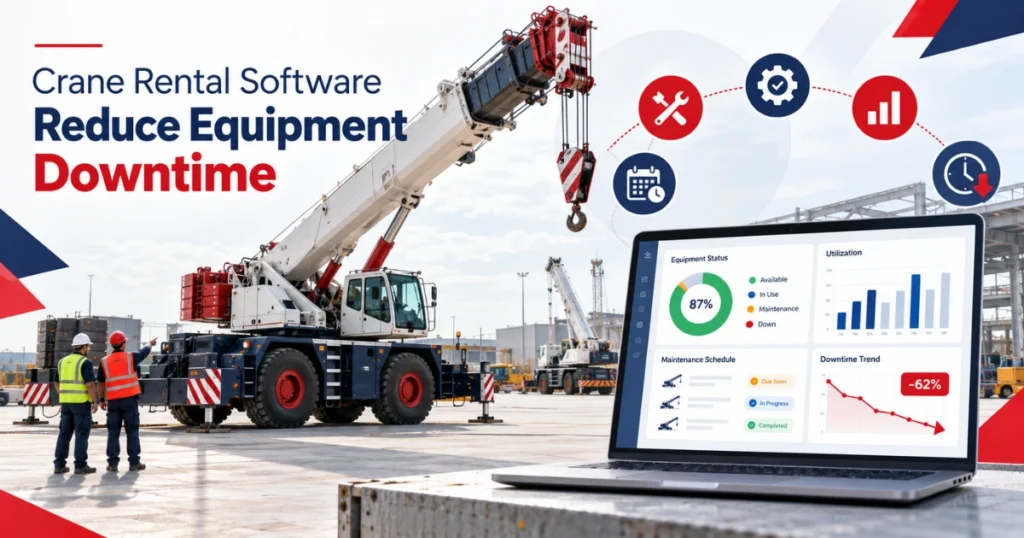
A crane can be physically present in the yard and still be unavailable for the next job. It may require inspection, scheduled servicing, replacement parts, configuration work, or approval before returning to service. Crane rental software can connect these readiness records with job schedules, equipment history, service activity, and fleet availability.
Downtime is not limited to the period when a crane undergoes repair. It may begin when a fault is reported and continue while the business waits for assessment, parts, technicians, transport, testing, or documentation.
Each delay affects more than the workshop. Dispatch may need another crane. Sales may need to revise a customer commitment. Transport plans may change. Another job could lose the replacement unit.
The purpose of software is not to guarantee that cranes will never fail. It is to help rental teams identify downtime earlier, coordinate the response, and maintain an accurate record of why equipment remains unavailable.
What Does Crane Equipment Downtime Include?
Downtime is any period when a crane cannot perform its planned rental or job activity.
Some downtime is planned. The company may reserve time for inspections, scheduled maintenance, certification-related work, cleaning, configuration, or component replacement.
Other downtime is unplanned. It may follow a breakdown, failed inspection, reported operating problem, transport incident, missing component, or unexpected repair.
Rental companies should distinguish between these two categories. Planned service can often be considered before confirming future jobs. An unexpected equipment restriction may require urgent schedule, transport, or customer changes.
Downtime should also have a reason and status. “Unavailable” alone does not explain whether the crane is waiting for diagnosis, parts, an external technician, repair, testing, or final approval.
Connect Crane Availability with Maintenance Status
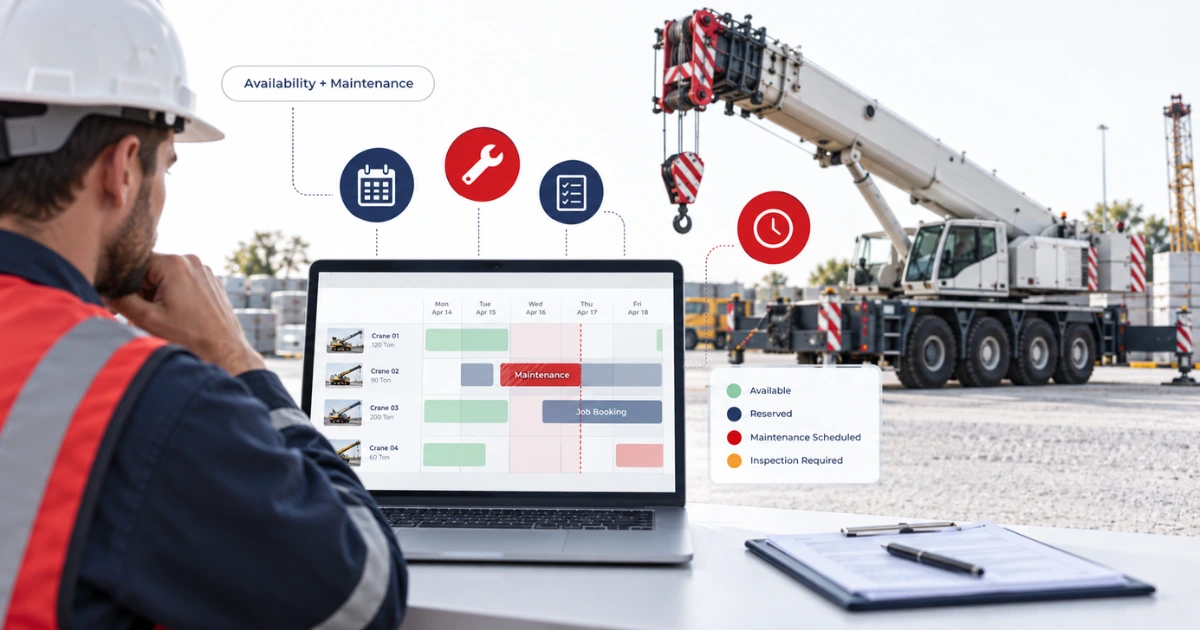
A booking calendar should not show a crane as available when unresolved service work remains open.
The asset record should connect the crane’s location and booking status with its inspection, repair, and maintenance condition. Relevant statuses may include available, reserved, on job, inspection required, maintenance scheduled, repair in progress, awaiting parts, or awaiting approval.
This gives dispatchers a clearer basis for assigning equipment.
For example, a mobile crane may return from one project on Friday and appear free for a Monday job. However, the crane may need a scheduled service based on its operating hours before the next assignment.
If booking and maintenance records remain separate, sales may confirm the Monday job without seeing the service requirement.
A connected crane fleet management software process should make the restriction visible before the crane is committed again.
Schedule Maintenance Before It Conflicts with a Job
Maintenance planning must consider future crane assignments.
Service needs may be triggered by dates, operating hours, meter readings, inspection results, recurring faults, or manufacturer requirements. Each trigger can affect when the crane should leave active rental availability.
A connected preventive maintenance system can maintain schedules, reminders, maintenance records, and equipment status.
The rental team can then compare the service window with upcoming jobs.
A crane approaching a service threshold may still be suitable for a short assignment. The same unit may not be appropriate for a longer project unless the maintenance requirement can be addressed within the job plan.
Software can present the dates, readings, and schedules. Qualified employees must still decide what maintenance is necessary and when the crane can return to work.
Turn Failed Inspections into Trackable Service Work
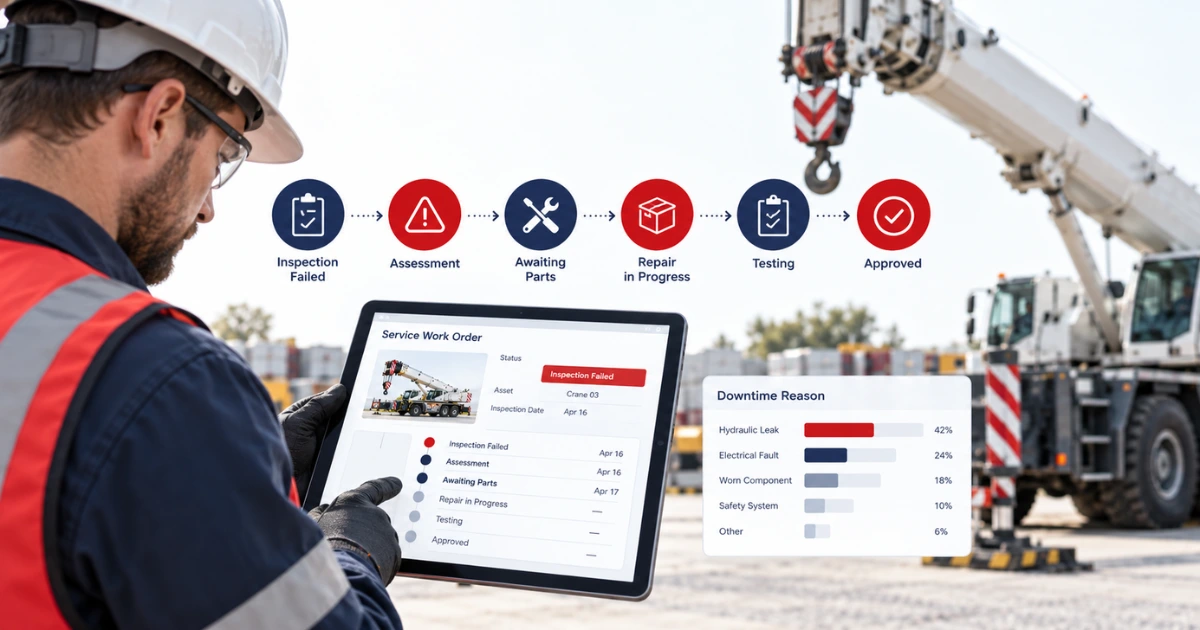
A failed inspection should create a clear route from the reported issue to the completed repair.
Without a connected process, inspection findings may remain in paper forms, emails, or photographs that do not change the crane’s operational status.
A digital inspection record may contain the crane identifier, date, reading, observed condition, notes, photographs, result, and employee responsible for the check.
If the inspection identifies a problem, the software should keep the crane unavailable and direct the finding into assessment or service.
A connected equipment inspection and maintenance process helps maintain the relationship between the original finding, repair activity, testing, and final release decision.
This also prevents a serious recordkeeping gap. Closing the inspection should not automatically mean the crane is available. The issue may still require diagnosis, parts, technical work, or approval.
Maintain a Complete Service History for Every Crane
Recurring problems are difficult to recognise when each repair appears as a separate job.
The service history should remain attached to the individual crane and may include:
- Reported fault and inspection findings
- Technician or external service provider
- Work completed and components used
- Operating-hour or meter readings
- Downtime and return-to-service date
This history allows technicians to review earlier work before starting another diagnosis.
It also helps fleet managers identify repeat issues. If a crane experiences similar hydraulic, electrical, control, or component problems across several jobs, the pattern may justify a wider technical or commercial review.
The decision may involve additional repair, component replacement, changed maintenance intervals, reduced utilization, asset transfer, or retirement. Software provides the history needed for the review, but the final decision should remain with qualified employees and management.
Coordinate Service Teams, Parts, and External Providers
A repair may remain open even after the cause is known.
The company may be waiting for a technician, replacement component, purchase approval, external service provider, transport arrangement, or vendor response.
Good crane management software should make these dependencies visible. Each service record needs a current status, responsible person, next action, and expected review point.
A service management system can also support service requests, technician scheduling, inspection tickets, service orders, asset records, notes, photographs, and parts-related activity.
Parts availability deserves particular attention. A small missing component can keep a high-value crane unavailable long after the technical problem has been identified.
Connecting service work with purchasing and parts inventory helps employees distinguish between a repair that is actively progressing and one that is waiting without clear ownership.
Use Operating Data to Identify Maintenance Requirements
Where supported by the crane and a suitable integration, operating data may provide additional maintenance context.
Useful information can include operating hours, engine runtime, location, temperature, pressure, fuel information, or diagnostic fault codes. The exact data depends on the equipment manufacturer, monitoring system, connectivity, and integration.
Connecting equipment usage data with rental and maintenance records may help teams compare actual use with service thresholds.
However, employees should validate the source and quality of the readings. Missing transmissions, sensor faults, connectivity gaps, or inconsistent units can affect the information.
A software alert or fault code should support technical review, not replace it.
Protect Maintenance Time in the Crane Schedule
Scheduling should cover more than active customer jobs.
The calendar may also need to reserve time for preparation, transport, inspections, planned maintenance, repair, testing, and post-service approval.
A connected rental scheduler can display asset availability alongside transport and service activity.
These records help prevent maintenance time from being treated as unused rental capacity.
This is particularly important when a job is extended. A customer may request additional days while the same crane has maintenance or another assignment scheduled immediately afterward.
The extension should trigger a review of the complete schedule before approval. Otherwise, one change can create a maintenance delay and another customer conflict.
Manage Crane Replacements Without Losing History
A crane may need replacement during an active job because of a technical concern, changed project requirement, or another approved reason.
The replacement process should preserve the history of both units.
The original crane record should show when it left the job, its operating reading, condition, reported issue, collection information, and new status. The replacement crane should receive its own assignment, delivery details, reading, and job history.
A crane rental job management software workflow should keep the customer job active without overwriting the first equipment assignment.
This protects the maintenance record and supports accurate downtime analysis. It also helps billing teams understand which crane worked on the project and when the exchange occurred.
If the faulty crane enters service, its availability should remain restricted until the required work and approval are complete.
Record the Actual Cause of Downtime
Downtime reporting becomes useful only when reasons remain specific and consistent.
General labels such as “maintenance” or “repair” provide limited information. More precise reason categories may include planned service, inspection failure, mechanical fault, electrical fault, parts delay, external service, transport delay, configuration work, or approval hold.
The following structure can support a useful downtime record:
| Downtime record | Information to capture |
| Equipment | Crane, model, serial number, and current location |
| Start | Date and time the crane became unavailable |
| Cause | Inspection, scheduled service, fault, damage, or another reason |
| Current stage | Assessment, awaiting parts, repair, testing, or approval |
| Responsibility | Employee, service team, vendor, or external provider |
| End | Date and time the crane returned to an approved status |
Consistent reason codes help management distinguish technical failures from process delays. A crane may spend one day under repair but another four days waiting for parts or final review.
Review Downtime with Utilization and Cost
Downtime should not be assessed as an isolated number.
Managers may also need to review rental days, utilization, repair cost, parts expenditure, transport, labour, job interruptions, and revenue by crane.
External loss data illustrates why maintenance and equipment reliability deserve financial attention. In an analysis of more than 400 mining-site losses recorded over a 20-year period, FM reported that mechanical breakdown represented 13% of losses. This figure covers insured mining operations, not crane rental companies, so it should be treated as wider heavy-equipment context rather than a rental benchmark.
For a crane rental company, useful questions include:
- Which units experience the most unplanned downtime?
- Which faults appear repeatedly?
- How much time is spent awaiting parts or approval?
- Do certain models require more service activity?
- Does the crane’s revenue still justify its maintenance and downtime?
A broader rental asset review can help teams consider availability, utilization, maintenance, and asset performance together.
High utilization should not automatically be treated as a positive result. A heavily booked crane may receive limited maintenance time and create greater scheduling pressure when service becomes necessary.
Planned Maintenance vs. Unplanned Downtime
The objective is not to eliminate all downtime. Some scheduled downtime is necessary for equipment care and operational requirements.
| Planned downtime | Unplanned downtime |
| Scheduled in advance | Begins after an unexpected problem |
| Can be reviewed against future jobs | May disrupt an active or upcoming job |
| Parts and resources may be arranged earlier | Parts or technicians may be required urgently |
| Has a defined maintenance purpose | May require diagnosis before work begins |
A better maintenance process may increase visible planned downtime while reducing unexpected interruptions. Therefore, managers should not judge the maintenance team only by total unavailable hours.
The more useful distinction is whether downtime was planned, necessary, correctly recorded, and completed within the company’s process.
What to Check During a Crane Software Demonstration
Do not ask the provider to show only a clean booking and successful return.
Use a scenario that includes an exception. For example, select a crane with an upcoming service requirement and attempt to assign it to a long project. Then record a failed inspection, create service work, assign a technician, add a parts delay, and test the return-to-service process.
Also test an active-job exchange. Confirm whether the original crane keeps its job and service history while the replacement receives a separate assignment.
Finally, review the resulting reports. The system should show why the crane was unavailable, how long each stage lasted, and when it returned to an approved status.
Ask which functions are standard, configurable, integration-based, or custom. Maintenance alerts, telematics data, parts records, technician scheduling, and external-vendor workflows may vary between configurations.
How PREXA365 Fits Crane Downtime Management
PREXA365 can be assessed against the scheduling, inspection, service, equipment-history, exchange, and downtime requirements covered in this article.
Its crane rental page describes quotation, scheduling, dispatch, equipment availability, inspection, maintenance, field activity, billing, and reporting functions.
During evaluation, use actual crane categories, service intervals, operating readings, downtime reasons, branches, and job scenarios from your business.
Confirm how equipment restrictions affect future availability, how service work progresses through different statuses, and how employees approve a crane for another job.
Conclusion
Crane rental software can support lower equipment downtime by connecting availability, inspections, service schedules, repair records, operating data, parts requirements, and job assignments.
Its main value is visibility and coordination. Teams can see why a crane is unavailable, what action remains open, who owns the next step, and whether the restriction affects another job.
Software cannot prevent every failure or replace qualified maintenance decisions. Results still depend on accurate records, suitable maintenance rules, available resources, and timely employee action.
Begin by separating planned from unplanned downtime. Then record specific causes, track each stage, and compare downtime with utilization, service cost, and revenue.
Looking for a clearer way to manage crane scheduling, maintenance, and equipment readiness? Book a free demo to review PREXA365 using a downtime scenario relevant to your fleet, or email sales@prexa365.com to discuss your crane, service, and reporting requirements.


