
Top 5 Challenges and Solutions of Scaling a Rental Business
A connected rental management application can help organize rental activity across assets, reservations, customers, maintenance, invoicing, and reporting. However, software alone cannot correct unclear processes or unreliable data. The business must also define responsibilities, update records consistently, and review whether its current operating model can support additional volume.
Scaling a rental business involves more than adding equipment, customers, or new locations. As the operation grows, teams must manage a larger inventory, more reservations, additional employees, increased maintenance activity, and a greater volume of customer and financial records.
Processes that worked for one location may become difficult to maintain across several branches. Spreadsheets may contain conflicting availability information; different teams may follow different rental procedures, and managers may struggle to compare performance across locations.
Rental market growth also creates opportunities for businesses that can build reliable operating processes. In its May 2026 forecast, the American Rental Association projected that combined U.S. construction and industrial equipment and general tool rental revenue would increase by 3.6% in 2026 to $83.5 billion. This updated industry figure replaces the unsupported $280.13 billion statistic in the original draft.
Growth in the wider market does not guarantee that an individual rental company will grow profitably. Businesses still need to control purchasing, utilization, maintenance, pricing, service quality, employee access, and cash flow.
What Does Scaling a Rental Business Mean?
Scaling means increasing the business’s capacity to handle more rental activity without allowing costs, errors, and delays to increase at the same rate.
A scalable process should make it possible to add assets, users, transactions, or locations while retaining clear controls over availability, pricing, maintenance, customer records, and financial activity.
Before expanding, managers should document how the business currently completes a rental from quotation through return. This baseline helps identify which processes require correction before transaction volume increases.
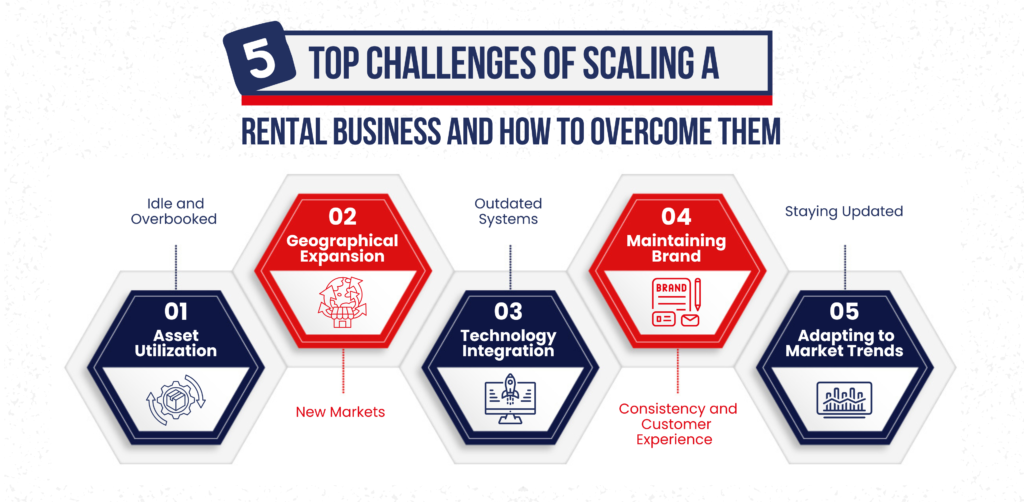
Challenge 1: Managing Assets Without Excessive Idle Time or Booking Conflicts
The Challenge
Rental assets generate revenue only when suitable equipment is available for customer demand. Too much idle inventory ties up capital, storage space, insurance, and maintenance resources. Too little available inventory may result in missed requests or booking conflicts.
The original draft states that maintaining 72% utilization produces the greatest profit. This figure should be removed because no supporting source or operating context is provided. A suitable utilization target depends on equipment category, age, maintenance requirements, location, seasonality, rental duration, and customer demand.
The Solution
Begin with consistent asset records and status definitions. Employees should understand which event changes an asset from one status to another and who is responsible for recording the change.
A connected asset management system can help employees review asset identity, location, condition, rental status, and history. Managers can then compare equipment utilization with revenue, age, downtime, and maintenance costs before deciding whether to retain, move, reprice, or replace an item.
Utilization should not be treated as a standalone measure. An asset with high utilization may still have weak financial performance if it is heavily discounted or frequently repaired. An asset with lower utilization may remain strategically important if it supports high-value projects or provides backup capacity.
Rental businesses working to improve these decisions can use a structured rental asset optimization approach that considers utilization, cost, availability, and demand together.
Preventing Booking Conflicts as Volume Grows
The availability check should cover the complete rental window, including preparation, delivery, collection, inspection, cleaning, and maintenance time where relevant.
A rental scheduler software can be assessed for calendar checks and reservation conflicts. Accurate scheduling still depends on current return dates, extensions, equipment statuses, and linked accessories being recorded correctly.
When extending an active rental, employees should check whether the equipment is already reserved for the next customer. An extension should not be approved without understanding its effect on the following booking.
Challenge 2: Expanding into New Locations Without Losing Control
The Challenge
Opening a new branch involves more than copying the existing location’s asset list. The business must manage employees, inventory ownership, pricing, taxes, customer records, maintenance resources, and reporting responsibilities.
Different branches may begin creating their own naming conventions, asset categories, discount rules, or customer processes. Over time, managers may struggle to compare performance because each location records activity differently.
Multi-location expansion also introduces equipment-transfer questions. Managers need to know whether an item is at its original branch, in transit, at another depot, on rent, or waiting for inspection.
The original Tokyo-and-Texas example should not imply that the same software automatically manages currencies, taxes, and legal requirements without configuration. These requirements must be assessed for each location and jurisdiction.
The Solution
Create a standard operating model before opening additional locations. The model should define:
- Check-out and return procedures
- Maintenance statuses
- Branch and transfer records
- Reporting definitions
- User permissions
Standardization does not mean every branch must operate identically. Local taxes, currencies, rental conditions, and customer requirements may differ. The business should separate common company-wide processes from location-specific requirements.
Managing Equipment Transfers
An asset should not appear available at the receiving branch while it is still being prepared or transported.
The record should include the source location, destination, asset identifier, dispatch date, receipt date, responsible employees, and condition at both ends of the transfer.
A connected rental inventory management system can help employees review inventory records across branches and warehouses. During evaluation, test whether permissions, transfers, availability, and location-specific reservations match the company’s intended process.
Managing Location-Based Access
Employees should receive access appropriate to their responsibilities. A branch employee may need local rental and asset records, while a regional manager may require visibility across several locations.
Access should be reviewed when an employee transfers, changes roles, takes on temporary responsibilities, or leaves the company. Expansion should not result in every user receiving broad access merely because role definitions have not been updated.
Challenge 3: Replacing Disconnected or Outdated Technology
The Challenge
A growing rental business may rely on separate tools for reservations, equipment status, maintenance, invoices, customer contact, and reporting.
Disconnected systems can create duplicate records and conflicting information. For example, the rental system may show an asset as available while the maintenance spreadsheet shows it awaiting repair.
The original draft states that outdated technology causes companies to lose up to 30% of their efficiency. It also claims that a company reduced downtime by 15% and repair costs by 20%. Remove these figures because no source or documented case study is provided.
The Solution
Begin by mapping the systems and spreadsheets currently used by each department.
Identify which system should hold the primary record for each type of information. Without this decision, integrations may copy conflicting data between applications.
PREXA365 maintains a rental software integration directory covering available connection. Each integration should be assessed separately for data fields, direction of transfer, authentication, error handling, setup, licensing, and support responsibility.
Plan Data Migration Carefully
Moving to a new platform should not mean importing every existing record without review.
The business should also decide how long legacy data must remain accessible and whether it will be migrated, archived, or retained under another approved process.
Avoid Replacing Technology Without Improving the Process
A new application may reproduce the same problems if unclear workflows are copied into it.
Before configuring the software, determine how the business wants a quotation, reservation, dispatch, return, inspection, maintenance task, and invoice to move through the operation.
Companies still relying on disconnected or outdated applications may find it useful to review the operational considerations involved in moving from legacy to modern rental management software.
Challenge 4: Maintaining Consistent Service Across a Growing Business
The Challenge
As a rental company adds employees and locations, customers may receive different information about equipment availability, pricing, deposits, returns, damage, and delivery.
One branch may confirm bookings immediately, while another requires approval. Employees may use different contract templates or apply discounts inconsistently. These differences can create customer confusion and internal disputes.
The original draft claims that automated reminders improved on-time returns by 25%. Remove this claim unless there is a documented source or approved PREXA365 case study.
The Solution
Define the parts of the customer journey that should remain consistent across the business.
Standard templates can support consistency, but employees should still understand when a situation requires review rather than following a template without judgement.
A customer relationship management process can help keep customer and interaction records connected with rental activity. The exact communication, workflow, and access functions should be confirmed during product evaluation.
Maintain Consistent Pricing Controls
Scaling often increases the number of employees allowed to quote or discount rentals. Without clear controls, similar customers may receive very different prices.
A rental quoting management system can be assessed for price lists, quotation records, approvals, and booking connections. Software should record an approved exception rather than replace the company’s pricing policy.
Train Employees by Role
Training should reflect the employee’s work. Reservation teams, warehouse employees, technicians, drivers, finance teams, and managers require different system and process knowledge.
Use practical scenarios rather than feature tours. Employees should practise handling:
- A standard booking
- An unavailable asset
- A rental extension
- A damaged return
- A maintenance restriction
- A customer credit
- A branch transfer
Review early transactions for missing information, incorrect statuses, unauthorised discounts, or incomplete return records.
Challenge 5: Responding to Changes in Demand
The Challenge
Rental demand changes according to season, location, customer activity, project schedules, weather, equipment category, and market conditions.
Purchasing more inventory whenever demand rises can leave the company with idle assets when conditions change. Waiting too long to respond may lead to missed requests and lost customer opportunities.
The original draft states that companies increased profits by moving assets during a construction boom. This should be treated as a possible strategy, not a verified result.
The Solution
Combine historical rental activity with current reservations, quotation activity, asset availability, and known customer requirements.
Relevant measures may include:
- Quotation volume
- Quote conversion
- Future reservations
- Utilization by location
- Missed rental demand
- Idle inventory
- Realized rental rates
- Maintenance restrictions
Managers should record the reason for unfulfilled requests. “Unavailable” alone may not explain whether the issue involved quantity, location, equipment condition, transport, attachments, or customer timing.
A rental reporting system can help organize operational records for review. Each KPI should have a defined calculation, data source, owner, and required response.
Forecasts Should Guide Rather Than Guarantee Decisions
Historical patterns can inform purchasing, transfers, pricing, and maintenance planning, but they do not guarantee future demand.
Forecasts should be reviewed with current sales information and customer knowledge. If demand rises for one equipment category, managers may consider transfers, supplier arrangements, pricing reviews, or additional purchases.
A demand planning agent can be assessed for relevant planning requirements. Its specific inputs, recommendations, and limitations should be confirmed before relying on it operationally.
How Rental Management Software Can Support Growth
Rental management software can provide a shared operational record as a business adds assets, employees, customers, and locations.
The system should be evaluated through complete rental scenarios, including quotation, reservation, asset assignment, dispatch, return, inspection, maintenance, invoicing, and reporting.
During evaluation, test whether the software can support:
- Company and location structures
- User roles and permissions
- Asset and inventory records
- Reservation checks
- Pricing and quotations
- Maintenance restrictions
- Customer records
- Invoicing and payments
- Reporting and integrations
Businesses comparing platforms can use this guide to choosing the right rental management software to prepare questions about requirements, implementation, support, and future capacity.
Conclusion
Scaling a rental business requires clear control over assets, locations, technology, customer service, and changing demand.
The goal is not simply to process more rentals. The business needs to increase capacity while maintaining reliable availability records, consistent customer terms, controlled pricing, complete maintenance information, and accurate financial reporting.
Begin by documenting the current rental process and identifying where employees rely on manual checks, duplicate entry, or management intervention. Correct data and process problems before expanding them across more assets or branches.
Technology can support growth by connecting operational records, but it does not replace clear responsibilities, employee training, policy decisions, or regular performance review.
Want to assess whether your current rental processes can support additional locations or equipment? Talk to the team of experts about your operational requirements or book a free demo to review relevant rental scenarios.


