
25 Essential Features Every Heavy Equipment Rental Software Should Have in 2026
Introduction
Heavy equipment rental software should do much more than show whether an excavator, loader, crane, or generator is available.
Rental teams need to manage equipment categories, individual machines, reservations, contracts, maintenance, inspections, pricing, billing, branch transfers, customer records, and performance reporting. When these areas are managed in separate spreadsheets or systems, employees spend more time checking information and correcting mistakes.
The software selected in 2026 should reflect how rental companies actually work. It should support the full rental process, from the first customer inquiry to the final invoice and equipment return.
This guide explains 25 features that rental companies should assess when comparing heavy equipment rental management software. It focuses on the practical value of each feature rather than presenting a long checklist with little context.
Why Feature-Rich Rental Software Has Become a Competitive Necessity in 2026
Heavy equipment rental businesses operate with high-value assets, tight delivery schedules, and customers who need fast answers.
When a contractor asks whether a loader is available next week, the rental team cannot afford to spend an hour calling branches or checking several files. The answer must account for current rentals, future reservations, maintenance holds, transport time, and the expected return condition.
Basic inventory software may show that the company owns eight loaders. It may not show that:
- Three are currently on rent
- Two are reserved for next week
- One is waiting for parts
- One has not passed its return inspection
- Only one is ready for the requested dates
That difference matters.
A modern rental system should give sales, operations, dispatch, service, and finance teams access to the same current information. It should also record what changed, who changed it, and how the change affects other bookings.
Industry education and business resources from the American Rental Association can also help rental operators stay informed about safety, training, financial management, market research, and operating practices.
What Modern Rental Businesses Should Expect Beyond Basic Inventory Tracking
Inventory tracking answers one question: What does the company own? Heavy equipment rental software must answer several more:
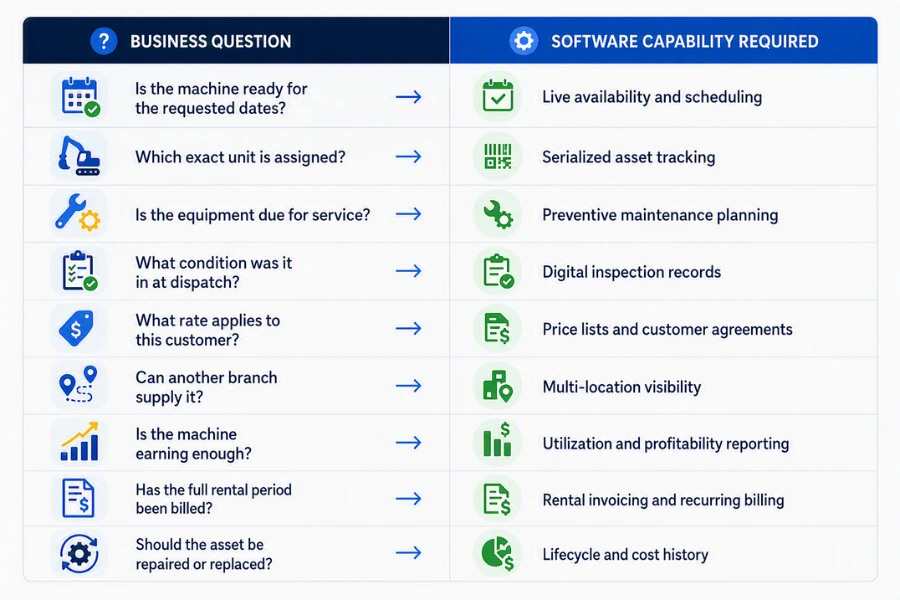
The system should not force teams to maintain separate versions of these answers.
When equipment, rental, service, customer, and financial records are connected, a status change in one area can update the rest of the operation.
For example, placing an excavator under maintenance should remove it from available inventory for the affected dates. Extending a rental should update the availability calendar and billing schedule. Returning one machine from a multi-asset contract should not close the entire rental.
How the Right Software Can Improve Utilization, Visibility, Profitability, and Customer Experience
Software does not create profit on its own. Its value comes from helping staff make better decisions and complete daily work with fewer errors.
A strong system can help rental teams:
- Confirm availability without calling several locations
- Prevent overlapping reservations
- Identify equipment that remains idle
- Plan maintenance around rental commitments
- Record damage before the next rental
- Apply the correct customer rate
- Bill extensions and recurring rentals on time
- Review fleet performance by category, model, or branch
These improvements depend on the quality of the features and how well they work together.
The following 25 features provide a practical framework for reviewing construction equipment rental software in 2026.
Asset and Inventory Management Features
Multi-Level Asset Management
Heavy equipment inventory is rarely a simple list.
A rental company may carry earthmoving equipment, aerial equipment, power systems, attachments, trailers, tools, and supporting accessories. Within each category, there may be different groups, manufacturers, models, capacities, and individual units.
Multi-level asset management allows the company to arrange equipment in a structure such as:
- Category → Group → Model → Individual asset
For example:
- Earthmoving → Excavators → 20-ton excavator → EXC-204
This structure helps sales teams search by the type of equipment a customer needs while allowing operations and service teams to manage the exact unit assigned. It also supports better reporting. Management can compare revenue at the category level, utilization by model, and maintenance cost for each serialized machine.
Without a clear asset hierarchy, equipment names become inconsistent. One employee may record “20T excavator,” while another uses “20-ton digger.” Those differences make searches and reports less reliable.
Real-Time Asset Availability Tracking
A machine should not be shown as available simply because it is not currently on rent.
True availability depends on its current condition, future reservations, location, inspection status, and maintenance schedule.
The software should clearly separate statuses such as:
| Asset status | Operational meaning |
| Available | Inspected and ready to rent |
| Reserved | Committed to a future rental |
| On rent | Currently assigned to a customer |
| In transit | Being delivered, collected, or transferred |
| Awaiting inspection | Returned but not yet cleared |
| Under maintenance | Unavailable due to service or repair |
| Awaiting parts | Repair cannot be completed |
| Out of service | Removed from active rental inventory |
Live availability helps sales staff respond faster and reduces the chance of promising equipment that operations cannot supply.
It also helps managers allocate assets based on actual readiness rather than ownership records alone.
Centralized Reservation Management
Construction rentals often involve more than one asset.
A contractor may rent an excavator, two attachments, a trailer, safety equipment, and a generator under the same agreement. Managing each item as a separate booking creates unnecessary work and increases the chance of missing part of the order.
Centralized reservation management should allow teams to:
- Add multiple assets to one reservation
- Assign specific serialized units when required
- Include bulk or non-serialized items
- Set different rental dates for individual lines
- Record delivery and pickup details
- Add attachments, services, and transport charges
- Convert the accepted reservation into a contract
Reservation changes should also be easy to manage.
If the customer extends only the excavator or returns one attachment early, the team should be able to update that line without rebuilding the full contract.
Automated Booking Conflict Prevention
Double bookings damage customer trust and create expensive last-minute work. A conflict may occur when two employees reserve the same machine, a rental extension overlaps with the next contract, or maintenance is scheduled during a confirmed booking.
Manual calendars cannot always catch these problems, particularly when equipment moves across branches. A rental equipment scheduling software system should validate availability before a reservation is confirmed. It should check:
- Current rental dates
- Future reservations
- Expected return time
- Inspection turnaround
- Maintenance blocks
- Branch transfer time
- Delivery and collection commitments
The system should warn the employee before the booking is saved, not after the customer has received confirmation. Conflict prevention is especially important when rental teams process phone, email, counter, and online bookings at the same time.
Serialized and Non-Serialized Asset Tracking
Not every rental item should be managed in the same way. High-value machines such as excavators, loaders, cranes, and forklifts usually require an individual record. Each unit has its own serial number, meter reading, condition, service history, and current value.
Smaller items may be managed by quantity. Examples include:
- Safety cones
- Cables
- Hoses
- Small hand tools
- Barriers
- Consumable accessories
Heavy equipment inventory management software should support both approaches. Serialized tracking answers, “Which exact machine did the customer receive?” Non-serialized tracking answers, “How many units are available?”
The software should also support rental packages that contain both types. A generator rental, for example, may include one serialized generator and several non-serialized cables.
Equipment Utilization Monitoring
Utilization is one of the most important measures in equipment rental. A machine can be expensive to own even when it sits in the yard. Depreciation, financing, insurance, storage, and registration continue whether the equipment is rented or idle.
Rental fleet management software should help managers review:
- Time utilization
- Dollar utilization
- Available days
- Rented days
- Maintenance days
- Idle days
- Revenue by asset
- Revenue by category
- Utilization by branch
Time utilization shows how often the asset is rented. Dollar utilization shows how well the asset produces revenue compared with its value or cost.
Looking at both measures prevents misleading conclusions. A machine may stay busy but earn weak revenue because its rate is too low. Another may rent less often but earn a strong return because it serves a specialist market.
A detailed guide to rental fleet management software can help businesses understand how asset status, rental activity, maintenance, and performance measures work together.
Asset Lifecycle Tracking
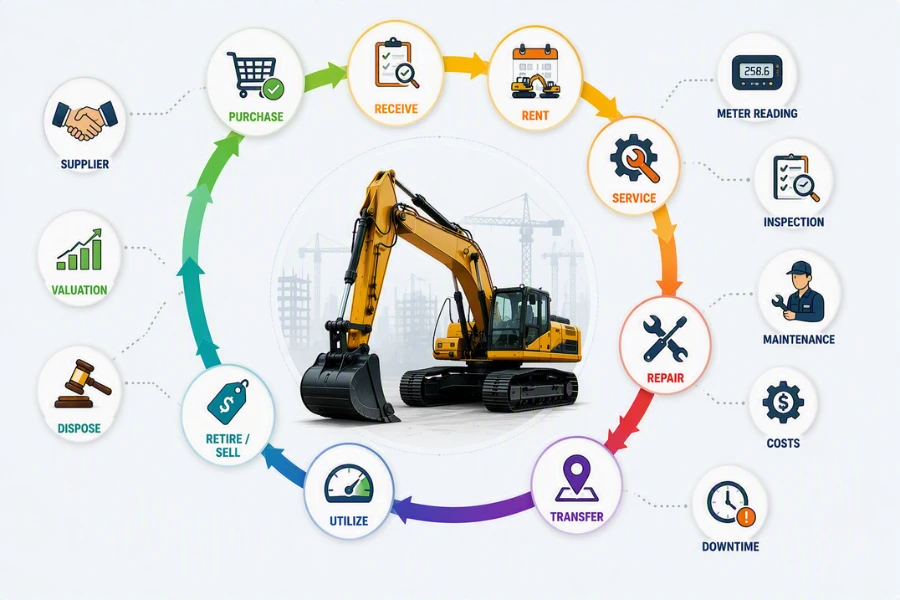
Every heavy equipment asset moves through a financial and operational lifecycle. It is purchased, received, inspected, rented, serviced, repaired, moved between locations, and eventually sold or retired. Asset lifecycle tracking creates a history of these events.
A complete record may include:
- Purchase date and cost
- Supplier and warranty details
- Rental history
- Meter readings
- Inspection results
- Maintenance and repair work
- Parts and labor costs
- Damage history
- Branch transfers
- Downtime
- Current book value
- Disposal date and sale value
This history helps managers evaluate whether an older machine should remain in the fleet. A working machine is not always a profitable machine. Rising repair costs, frequent downtime, weak utilization, and declining resale value may show that replacement is the better choice.
Depreciation Tracking and Asset Valuation
Rental revenue should contribute toward the current cost of owning equipment and the future cost of replacing it. Depreciation tracking helps rental businesses monitor how asset value changes over time.
Different equipment types may require different depreciation methods, useful lives, and residual-value assumptions. A small attachment should not necessarily be treated in the same way as a high-value crane.
The software should store:
| Valuation record | Why it matters |
| Acquisition cost | Shows the original investment |
| Depreciation method | Determines how value is reduced |
| Useful life | Supports long-term planning |
| Current book value | Shows the remaining recorded value |
| Expected resale value | Supports disposal planning |
| Repair and overhaul cost | Helps assess whether the asset is worth keeping |
Linking valuation with rental and service history provides a clearer view of asset performance than accounting value alone.
Reservations and Rental Scheduling Features
Equipment Availability Calendar Views
A list of reservations can be difficult to interpret during a busy week. Calendar and timeline views make equipment commitments easier to understand. Staff should be able to see when each unit is booked, when it is expected back, and whether time has been allowed for inspection or service.
Useful calendar filters include:
- Equipment category
- Individual asset
- Branch
- Customer
- Rental status
- Maintenance status
- Delivery date
- Expected return date
A visual calendar also helps staff find gaps. If one loader returns on Tuesday afternoon and the next booking begins Thursday morning, the team can plan inspection and maintenance during the open period.
The calendar should update when a rental is extended, returned early, cancelled, or placed on hold.
Rental Return Management
Returns are more complicated than marking a contract as complete. Equipment may return late, damaged, dirty, low on fuel, or with a different meter reading than expected. A customer may return some items while keeping others.
Rental return management should support:
- Full returns
- Partial returns
- Asset exchanges
- Early returns
- Late returns
- Meter and mileage capture
- Fuel checks
- Damage recording
- Cleaning or refueling fees
- Return inspection status
A partial return should close only the returned items. The remaining equipment should stay active on the contract and continue billing where applicable. The return process should also update equipment status. A returned machine may need to move to “Awaiting Inspection” rather than directly to “Available.”
Multi-Location Asset Visibility
Rental companies with several branches need a single view of the full fleet. Without multi-location visibility, one branch may turn down a rental while the required equipment sits idle at another location.
The system should show:
- Current branch
- Current job site
- Available quantity by branch
- Future reservations by location
- Equipment awaiting transfer
- Local maintenance holds
- Expected return dates
- Transport requirements
This information helps staff determine whether an inter-branch transfer makes sense. It also supports better fleet distribution. If one branch regularly runs short of excavators while another has low utilization, management can move equipment based on evidence rather than occasional requests.
Asset Transfer Management
Moving equipment between branches requires more than changing its location field. The company needs to know who requested the transfer, when the asset left, how it is being transported, what the movement costs, and when it arrived.
Asset transfer management should record:
- Origin and destination
- Requested transfer date
- Expected arrival date
- Actual departure and arrival
- Transfer status
- Assigned driver or carrier
- Transport cost
- Inspection requirements
- Related customer reservation
During the transfer, the equipment should not appear available at both locations. Clear transfer records also help management measure how much is being spent moving equipment because of poor fleet distribution.
Equipment Rental Booking Software for Faster Order Entry
Booking software should help employees create accurate reservations without making the process difficult. When a customer requests equipment, the employee should be able to search by category, date, location, capacity, model, or attachment requirement.
The booking process should show:
- Suitable equipment
- Available units
- Applicable customer rates
- Required attachments
- Delivery options
- Deposit or credit requirements
- Related maintenance restrictions
The system should also allow the employee to save an inquiry or tentative booking without immediately blocking the equipment forever. Once the customer confirms, the approved information should carry into the reservation and rental contract.
For businesses handling construction assets, construction equipment rental software can provide a clearer structure for availability, reservations, transport, inspections, maintenance, and billing.
Maintenance, Service, and Inspection Features
Preventive Maintenance Scheduling
Waiting for a machine to fail is one of the most expensive ways to manage maintenance. A breakdown during a rental can lead to lost income, urgent parts, overtime, replacement transport, customer credits, and damage to the relationship.
Preventive maintenance scheduling helps service teams plan work before failure occurs. Maintenance may be triggered by:
- Calendar interval
- Operating hours
- Mileage
- Usage cycles
- Inspection result
- Manufacturer recommendation
- Telematics reading
The schedule should also consider future bookings. If an excavator is approaching its service limit and has a long rental next week, the system should help the team plan service before dispatch. Maintenance work should block the asset from rental only for the period when it is genuinely unavailable.
Maintenance Alerts and Notifications
A maintenance schedule is useful only when the right people know what needs attention. Alerts should notify service staff when equipment is approaching or has passed a service threshold.
They may also warn rental and dispatch teams when a maintenance issue affects availability. Useful notifications include:
- Service due soon
- Service overdue
- Meter threshold reached
- Inspection failed
- Safety certificate expiring
- Required part received
- Work order waiting for approval
- Asset ready to return to rental inventory
Notifications should be assigned to a responsible person or team. A general alert that everyone can see but nobody owns often receives no action. The system should record who was notified, what action was taken, and whether the task remains open.
Service Management and Work Orders
Service work needs a structured record. A technician should not have to depend on handwritten notes or search through emails to understand what is wrong with a machine.
A service work order should include the following ideally:
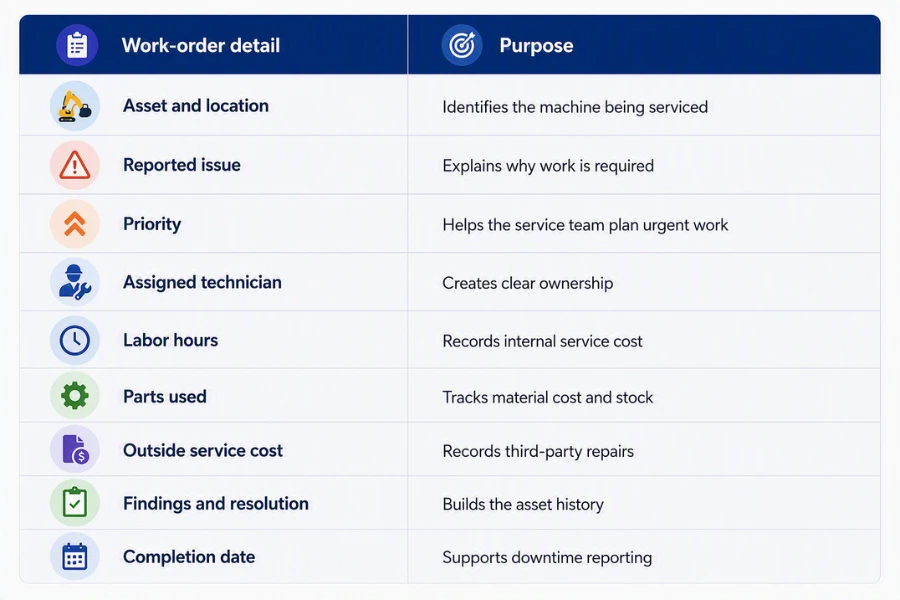
Work orders should cover preventive service, emergency repairs, inspections, warranty claims, and refurbishment work. When the order is completed, the equipment status should update only after required checks have been passed.
Digital Inspection Management
Heavy equipment should be inspected before and after rental. Paper forms can be lost, completed inconsistently, or stored away from the asset record. Digital inspections give every branch and technician the same process.
The software should support inspection templates based on equipment type. An excavator checklist may differ from a generator or scissor lift checklist. Required fields can make sure key safety and condition checks are not skipped.
A digital inspection should record:
- Inspector
- Date and time
- Meter reading
- Fuel level
- Tire or track condition
- Fluid levels
- Visible damage
- Safety items
- Cleanliness
- Final inspection result
The result should affect availability. Equipment that fails inspection should not return to ready-to-rent inventory.
Photo and Video Inspection Documentation
Written notes do not always show the full condition of equipment. Photos and videos create a dated record of how the asset looked before dispatch and after return.
This can help when a customer disputes damage or when staff need to compare wear over several rentals.
Media should be attached to exact asset, rental contract, inspection, date and time, employee completing the check, reported damage item, etc.
A few clear images are more useful than dozens of unlabeled files. The system should allow staff to add comments or mark the damaged area so that service and billing teams understand what needs attention.
Customer, Sales, Pricing, and Billing Features
Customer Relationship Management
Rental activity begins before the reservation is created. A customer relationship management function should store account information, contacts, job sites, credit details, communications, quotes, contracts, service concerns, and rental history.
This gives sales and service teams context when the customer calls. Instead of asking the customer to repeat information, the employee can see:
- Current and previous rentals
- Open quotes
- Commonly rented equipment
- Agreed pricing
- Delivery locations
- Credit status
- Outstanding issues
- Key contacts
The customer record should also separate the billing contact, site contact, project manager, and equipment user when these are different people.
Opportunity, Quote, and Sales Management
Rental software should help sales teams manage an inquiry from the first conversation to the signed contract. An opportunity record can capture what the customer needs, the expected rental period, job-site details, estimated value, decision date, and next action.
When the customer is ready for pricing, the opportunity should become a quote without re-entering the same details.
Quote management should support:
- Multiple equipment lines
- Rental periods
- Delivery and pickup charges
- Services and attachments
- Customer-specific rates
- Taxes
- Deposits
- Quote expiry dates
- Approval for special discounts
Once accepted, the quote should become a reservation or contract using the approved terms. This reduces differences between what sales promised and what operations delivers.
Flexible Pricing and Price List Management
Heavy equipment pricing is rarely one fixed daily rate. Rates may vary by customer, rental duration, branch, season, equipment category, project, or contract agreement.
The software should support:
- Daily, weekly, and monthly rates
- Custom billing periods
- Customer-specific prices
- Contract pricing
- Branch-based rates
- Volume discounts
- Promotional rates
- Weekend or holiday rules
- Overage charges
- Meter-based charges
Pricing controls should also show when an employee changes the standard rate. Large discounts may require approval before the quote can be sent. This protects margins while still allowing sales staff to handle negotiated agreements. The customer’s accepted rate should carry the quote into the contract and invoice without being typed again.
Automated Invoicing and Billing
Rental billing can become complicated when equipment stays with the customer for weeks or months. The business may need to invoice weekly, every 28 days, monthly, at return, or according to a custom agreement.
Equipment rental automation software should create invoices from the rental terms and actual activity.
It should account for:
- Rental start and end dates
- Recurring billing periods
- Rental extensions
- Partial returns
- Equipment exchanges
- Delivery and pickup
- Meter usage
- Fuel
- Cleaning
- Damage
- Discounts
- Taxes
The purpose is not to remove financial review. It is to reduce manual calculation and make sure valid charges are not forgotten. Faster, more accurate billing also gives the accounts receivable team a clearer starting point for collection.
Reporting, Forecasting, and Integration Features
Reporting and Business Intelligence
Rental companies collect a large amount of operational data. Reports should turn that data into decisions. Management should be able to review performance by asset, model, category, customer, salesperson, branch, and period.
Useful measures include industry standard KPI’s that rental businesses can track to maximize their outcomes:
- Time utilization
- Dollar utilization
- Revenue by asset
- Revenue by category
- Maintenance cost per operating hour
- Downtime by reason
- Average rental duration
- Rate performance
- Lost rental opportunities
- Fleet age
- Return delays
- Branch transfer costs
Reports should allow users to move from a summary to the underlying records. For example, if maintenance cost rises for one model, the manager should be able to see the individual units, work orders, parts, and downtime behind the result.
Demand Forecasting and Capacity Planning
Rental demand changes with seasons, project activity, customer contracts, weather, and local construction work.
Demand forecasting compares previous rental activity with current inquiries, future reservations, and fleet availability.
It can help managers identify:
- Equipment categories likely to run short
- Assets that may remain idle
- Branches that need transfers
- Seasonal purchasing needs
- Maintenance periods that may create shortages
- Categories where disposal may make sense
Forecasting should support a decision, not produce a complicated chart with no clear action. For example, if excavator demand rises every spring, the business can schedule major maintenance during the slower winter period. It can also move units between branches before bookings exceed local capacity.
Capacity planning helps the company use its existing fleet more effectively before committing capital to additional equipment.
Accounting Integration, Cloud Access, and Microsoft Tools
Rental operations and accounting should not rely on separate versions of the same transaction. When a contract is billed, the invoice, customer balance, tax, payment status, and revenue posting should reach the financial system without repeated manual entry.
Accounting integration can help keep records consistent across:
- Customers
- Invoices
- Credit notes
- Payments
- Taxes
- Deposits
- Revenue accounts
- Asset purchases
- Depreciation
- Service costs
Cloud access also matters for businesses working across branches, yards, workshops, offices, and customer sites. Authorized employees should be able to review the information needed for their role without depending on a specific office computer.
Microsoft ecosystem integration can connect rental operations with tools used for financial management, reporting, documents, email, approvals, and team communication.
A rental management solution built around connected asset, reservation, service, billing, and reporting records can reduce the gaps created when each department works in a separate system.
How to Evaluate Heavy Equipment Rental Software
A long feature list does not automatically mean the software is suitable. The better question is whether the features reflect the way the rental company operates. Before selecting a system, test it against real situations from your business.
Ask the provider to show how the software handles scenarios such as:
- A customer reserves several machines and attachments under one contract.
- One machine is returned early while the rest remain on rent.
- A rental is extended into the next confirmed reservation.
- A returned asset fails inspection.
- A machine reaches its service threshold during a rental.
- Another branch has the only suitable unit available.
- The customer receives a special rate and recurring invoice.
- A manager needs to compare revenue, utilization, and repair cost for one asset.
These examples reveal more than a prepared product presentation. The system should also be reviewed by the people who will use it: sales, rental counter staff, dispatch, service, finance, and management.
Each team sees a different part of the rental cycle. A feature that works well for sales may still create extra work for service or billing if the records are not connected.
A Practical Software Evaluation Table
| Evaluation area | Question to ask |
| Asset management | Can we manage categories, models, serialized units, and bulk items? |
| Scheduling | Does the system prevent conflicts before confirmation? |
| Maintenance | Can service be triggered by time, hours, mileage, or inspections? |
| Returns | Can it handle partial returns, exchanges, damage, and meter readings? |
| Pricing | Can it apply customer, contract, branch, and duration-based rates? |
| Billing | Can it manage recurring invoices, extensions, and additional charges? |
| Locations | Can every branch see and transfer equipment correctly? |
| Reporting | Can we review utilization, revenue, cost, and downtime by asset? |
| Integration | Can rental and financial records remain consistent? |
| Access | Can staff work securely from the office, yard, workshop, or job site? |
The final decision should consider operational fit, implementation support, data migration, training, security, integrations, and long-term system ownership—not just the number of features shown on a website.
Conclusion
Inventory tracking tells a rental company what it owns. It does not provide enough information to manage reservations, conflicts, maintenance, inspections, pricing, returns, billing, branch transfers, and asset performance.
Heavy equipment rental software should connect these activities around the same customer, contract, and equipment records. When an asset changes status, the effect should be visible to every team that depends on it.
The 25 features in this guide should not be treated as isolated checkboxes. Their value depends on how they work together.
Availability tracking is more useful when it includes reservations and maintenance. Inspection records are more useful when they update equipment status. Utilization reporting is more useful when it includes downtime, rates, and repair costs.
When reviewing software, focus on the work it can help your team complete and the decisions it can help managers make. Building a Rental Operation That Can Handle Growth As a rental fleet expands, manual coordination becomes harder.
More equipment creates more reservations, inspections, repairs, transfers, invoices, and customer questions. Adding employees without improving the underlying process may simply create more handoffs and more versions of the same information.
A connected system gives rental businesses a clearer structure for managing that growth.
Looking for a modern rental management solution? Request a free demo or email our team at sales@prexa365.com to explore how we can help automate operations, improve asset utilization, and accelerate business growth.


