
Best Software for Managing Boom Lift & Scissor Lift Rentals
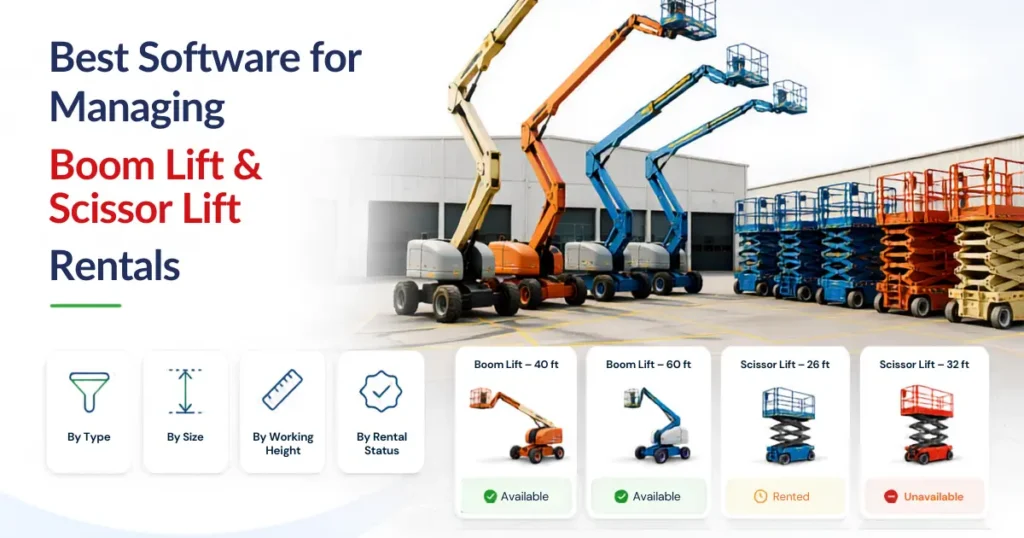
Managing boom lifts and scissor lifts involves more than knowing which machines are in the yard. Rental teams must track working height, platform capacity, reach, operating hours, inspections, maintenance, delivery, customer pricing, and the condition of every serialized unit.
The right aerial equipment rental software should connect these records, so sales, operations, transport, service, and finance teams work from consistent equipment information. Fleet visibility, booking and scheduling, maintenance tracking, digital agreements, and equipment history as relevant parts of an aerial rental workflow.
This matters because a lift may be physically present at a branch but unavailable for rental. It could already be reserved, awaiting inspection, scheduled for maintenance, missing an attachment, or moving between locations.
The best software is therefore not necessarily the platform with the longest feature list. It is the one that helps employees answer practical questions quickly:
- Which lift meets the customer’s requirements?
- Is it available for the entire rental period?
- Has it completed the required inspection?
- When must it be delivered, serviced, exchanged, or collected?
This guide explains the main capabilities to assess when selecting software for boom lift, scissor lift, and other aerial equipment rentals.
Connect the Full Lift Rental Process
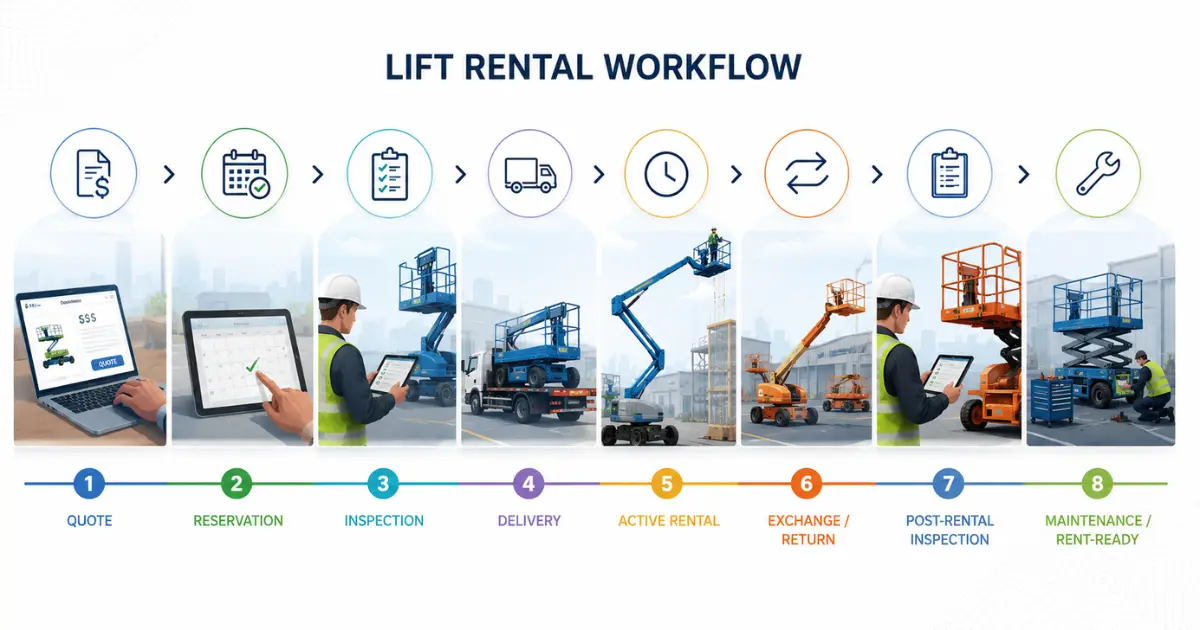
A lift rental passes through several teams. Sales records the customer’s requirements and prepares the quotation. Operations confirm availability and allocates the equipment. Transport delivers the unit. Service manages inspections and maintenance. Finance handles invoicing and payment records.
When these teams use separate spreadsheets or applications, information becomes difficult to follow. A suitable platform should connect the process from customer enquiry and quotation through reservation, equipment assignment, delivery, active rental, return, inspection, maintenance, and invoicing.
This does not mean every employee needs access to every record. Sales may require customer, availability, and pricing information. Technicians need inspections and service history. Transport teams need equipment movement and job-site details. Finance may require invoice and payment information.
Permissions can differ while the underlying rental and asset records remain connected.
Organize Equipment Groups and Individual Units
Customers often request an equipment class before a specific unit is allocated. A contractor may ask for a 45-foot articulating boom lift without requiring a particular serial number.
The reservation can initially hold the appropriate equipment group. Operations can assign the physical lift closer to dispatch after reviewing its branch, condition, operating hours, inspection result, and maintenance schedule.
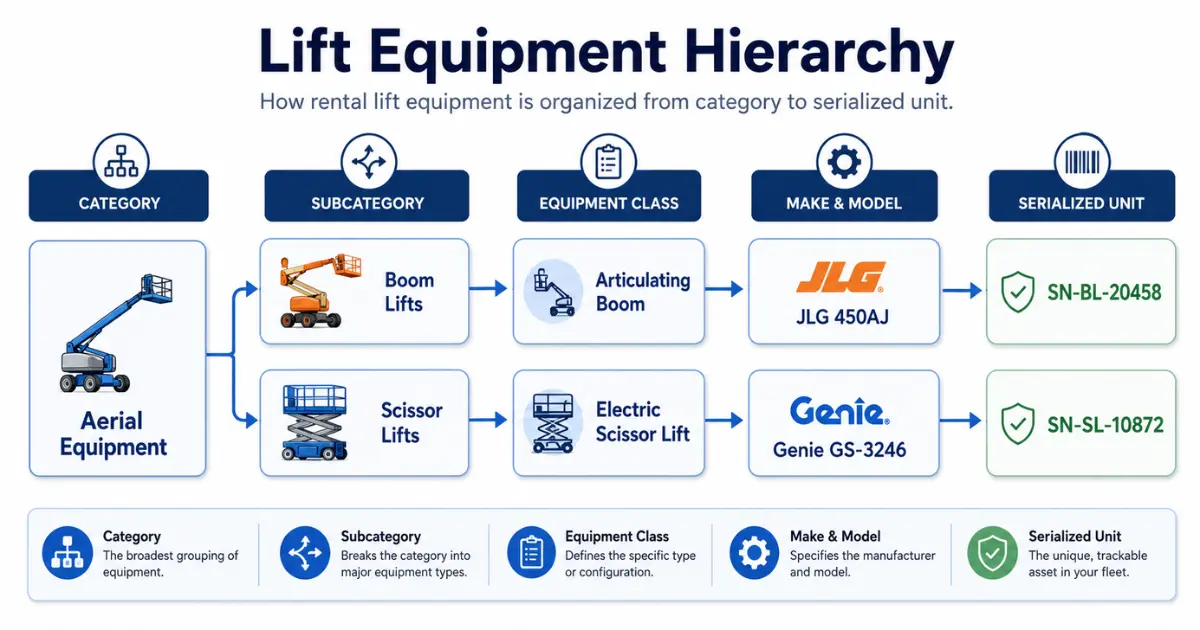
The software should therefore manage two connected levels:
- The equipment class or group requested by the customer
- The individual serialized unit supplied for the rental
This gives sales a way to reserve capacity while allowing operations to select a suitable machine.
Companies managing several powered-access categories may also use lift rental management software to maintain boom lifts, scissor lifts, telehandlers, vertical mast lifts, and related equipment within a consistent classification structure.
Each lift should have its own record containing the make, model, serial number, asset group, branch, operating status, meter reading, and equipment history.
Technical specifications are equally important. Searchable fields may include working height, platform height, horizontal reach, platform capacity, machine width, equipment weight, power source, terrain suitability, and stowed dimensions.
Two lifts of the same model may have different service histories, operating hours, damage records, options, and locations. Without an individual asset record, rental or maintenance activity can easily be assigned to the wrong unit.
Check Actual Availability Before Confirming a Rental
A lift should not be considered available simply because it is parked at a depot.
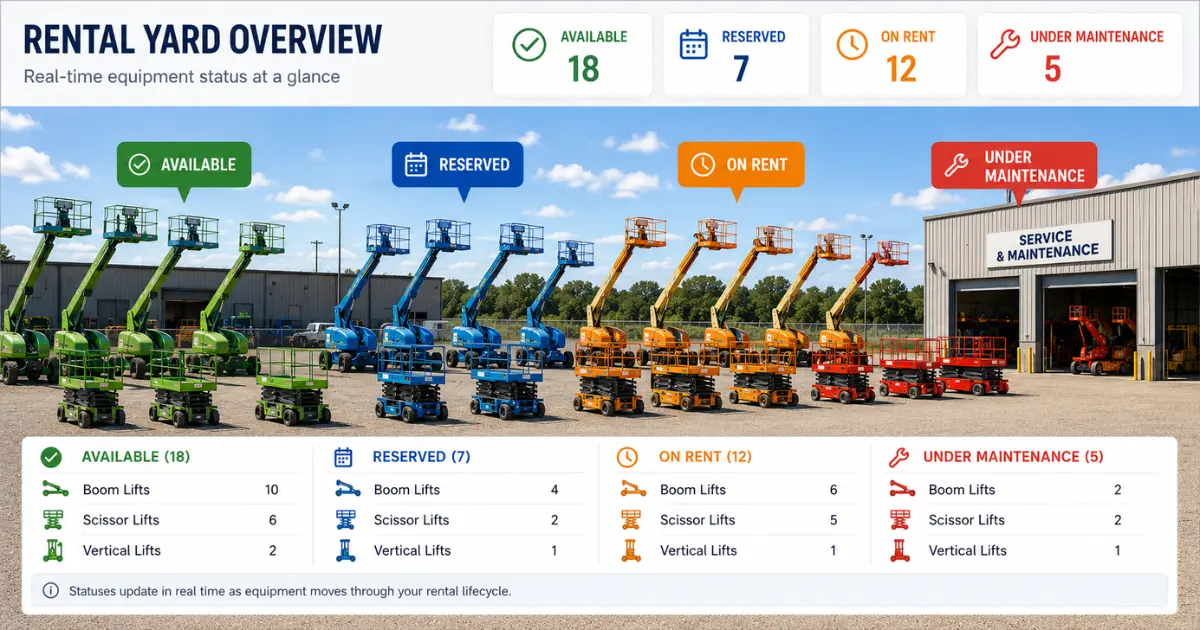
Its operational status may be available, reserved, on rent, on hold, awaiting inspection, under maintenance, in transit, or removed from service.
Date-based availability is also essential. A lift may be on rent today but available next week. Another may be physically present today but reserved for delivery tomorrow.
A connected equipment scheduling system should help employees review current rentals, future reservations, expected return dates, maintenance restrictions, branch location, and relevant preparation or transport periods before confirming another booking.
This is particularly important when a customer requests an extension. If a scissor lift is retained for three additional days, the revised end date may overlap with its next reservation. The employee needs to identify that conflict before approving the extension.
The same principle applies to related equipment. A rental may require a trailer, charger, attachment, or other supporting item. Reserving the lift without checking required accessories can leave the customer with an incomplete order.
Create Quotes Using Current Equipment Records
Quotation and reservation processes should use the same equipment and availability information.
The salesperson should record the customer, job-site address, site contact, required rental dates, height and reach needs, platform capacity, operating environment, and delivery requirements.
This information can then be used to search for a suitable equipment group. The team should avoid promising a specific serialized unit until its availability and condition have been confirmed.
Boom lift rental software and scissor lift rental software should support daily, weekly, monthly, project, or customer-specific rates where those pricing methods form part of the business process.
The quotation may also include delivery, pickup, usage, service, fuel, or other approved charges. Employees should be able to see which rate was applied, why it was selected, and whether an exception required approval.
Once the customer accepts the quotation, the agreed equipment type, dates, prices, delivery details, and contractual information should move into the rental order without requiring employees to recreate the transaction.
A single contract may contain several different lifts. Each unit should still retain its own assignment, rental period, meter readings, inspection records, return status, and billing history.
Inspect Lifts Before Dispatch and After Return
Pre-rental inspections help document the equipment’s condition and readiness before it leaves the branch.
The checklist should reflect the lift type and follow applicable requirements, manufacturer guidance, and company procedures. Depending on the equipment, it may cover controls, emergency functions, tyres, guardrails, alarms, fluid levels, batteries, fuel, safety devices, visible condition, and operating hours.
The importance of properly inspecting aerial equipment is reinforced by workplace-safety data. CDC/NIOSH reports that 1,380 workers were injured while operating aerial lifts or scissor lifts between 2011 and 2014. The same source reports 87 fatalities during that period. These figures do not measure rental-software performance, but they demonstrate why equipment condition, inspection records, maintenance restrictions, and trained personnel matter in powered-access operations
Rental software does not replace qualified inspection, legal duties, manufacturer instructions, or employee training. It supports the process by connecting the checklist, result, notes, photographs, meter reading, date, and inspector with the correct lift.
If a unit fails inspection, its status should prevent dispatch. The issue may require technical assessment, maintenance, testing, and approval before the lift returns to available inventory.
Post-rental inspections are equally important. At return, employees may need to record the final meter reading, condition, fuel or battery level, missing items, damage, cleaning requirements, and reported operating concerns.
A returned lift should not become available automatically. Its status should remain awaiting inspection, cleaning, maintenance, or approval until all required work is complete.
Manage Delivery, Pickup, Exchanges, and Partial Returns
A transport ticket should remain connected with the rental order and the assigned unit.
Useful delivery information may include the job-site address, customer contact, delivery window, access instructions, lift dimensions, assigned driver or team, equipment identifier, and transport charge.
Separate movement records may be required for initial delivery, equipment exchange, partial pickup, branch transfer, and final collection.
A lift may need to be replaced during an active rental because of a reported fault, specification issue, changing site requirement, or another approved reason.
The exchange process should preserve the original unit’s rental dates, meter readings, inspection history, and reason for removal. The replacement lift should receive its own assignment under the active contract.
The original record should not be overwritten. It may need to enter inspection or maintenance while the replacement continues under the customer’s rental.
Partial returns also need careful handling. If a contractor returns one scissor lift but keeps two boom lifts, the returned unit should stop billing according to the agreed return terms while the remaining equipment stays active.
Plan Maintenance and Track Downtime
Availability depends on equipment condition as well as the booking calendar.
Maintenance may be triggered by a calendar date, operating hours, meter readings, inspection findings, or manufacturer requirements. The system should distinguish between approaching, scheduled, overdue, in-progress, awaiting parts, and completed service.
A lift approaching a service threshold may be suitable for a short rental but inappropriate for a longer contract unless maintenance can be planned appropriately.
Service records should remain connected with the individual unit, regardless of whether the work is completed internally or by an external provider.
The history may include the reported problem, technician, work completed, parts used, dates, meter readings, equipment downtime, testing, and approval for return to service.
Recurring faults should be visible. If the same boom lift repeatedly develops hydraulic, electrical, or control problems, managers need to review the pattern rather than treat every repair as an unrelated event.
Downtime should also be classified. A lift waiting two hours for a return inspection is different from one waiting several weeks for a replacement component.
Useful downtime reasons may include inspection backlog, scheduled maintenance, unexpected repair, parts delay, external service, damage review, or approval hold.
Tracking the reason and duration helps managers determine whether availability problems are caused by equipment condition, workshop capacity, parts shortages, or internal processing delays.
Connect Billing with Actual Rental Activity
Lift rental billing should reflect what occurred during the rental rather than only the original quotation.
The final amount may change because of an extension, early return, equipment exchange, excess operating hours, delivery, pickup, field service, fuel, cleaning, or approved damage-related charges.
Each charge should remain connected with the correct contract and, where possible, the relevant unit. This gives employees a clearer basis for answering customer billing questions.
Short rentals may be invoiced after return, while long-term contracts may require weekly, monthly, or recurring billing.
Connections with QuickBooks or Microsoft Dynamics 365 Business Central may reduce repeated entry between rental and finance teams. Depending on the configuration, information may include customers, vendors, invoices, line items, purchase orders, receipts, inventory, fixed assets, payments, and financial postings.
The business must still decide which system owns each record, when approved transactions transfer, and how incomplete or failed transactions are reviewed.
Manage Vendors and Rerented Equipment
A rental company may need to source a lift from another supplier when its own fleet is fully booked or does not include the required specification.
Rerented equipment should remain connected with the customer’s rental requirement and the supplying vendor.
The record may include supplier dates, customer dates, vendor cost, customer price, delivery terms, receipt status, extensions, returns, and expected margin.
Vendor records may also support purchases of fleet equipment, parts, maintenance, transport, and external inspections.
Full and partial receipts should be recorded accurately. If a supplier delivers one item now and a related attachment later, the remaining quantity should stay open rather than being treated as received.
Measure Lift Rental Performance
A lift should not be judged only by total rental revenue.
Managers also need to understand how frequently the unit is rented, how long it remains unavailable, how much it costs to maintain, and whether it provides a reasonable return relative to its cost.
Useful measures include rental days, time utilization, financial utilization, rent-ready percentage, maintenance costs, downtime, and revenue by unit.
Time utilization compares rental time with the time the asset was available. Financial utilization compares rental revenue with the equipment’s original cost or another defined financial measure.
Both should be reviewed together.
A lift with high time utilization but weak financial utilization may require a pricing review. A specialist unit with lower time utilization may still generate an acceptable financial return. Low results across both measures may indicate weak demand, poor location, maintenance problems, unsuitable pricing, or excess fleet capacity.
Reports should allow managers to move from a fleet-level result to the individual assets behind it. This makes it easier to distinguish a wider category problem from a few underperforming or unreliable units.
Lift Rental Software Buying Checklist
Use a complete rental scenario during a demonstration rather than reviewing isolated screens.
| Area | What to confirm |
| Equipment records | Categories, models, serial numbers, locations, and specifications |
| Availability | Date-based status, branch visibility, and conflict warnings |
| Pricing and quotes | Multiple rates, revisions, approvals, and conversion to rental |
| Logistics | Delivery, pickup, transfer, and job-site records |
| Inspections | Lift-specific checklists, readings, notes, photos, and failed-check actions |
| Maintenance | Calendar, hour, or meter-based schedules and service history |
| Changes | Extensions, exchanges, partial returns, and additional charges |
| Reporting | Utilization, downtime, rent-ready status, revenue, and maintenance cost |
| Integrations | Rental, accounting, inventory, payment, and reporting connections |
| Data and access | Migration, permissions, branch controls, and supported devices |
Ask the vendor to demonstrate a quotation containing several lift types, an equipment assignment, delivery, failed inspection, replacement unit, partial return, additional charge, maintenance task, and invoice.
This scenario will reveal more than a general feature presentation.
Conclusion
The best software for boom lift and scissor lift rentals should provide a consistent record of equipment identity, specification, availability, inspection status, maintenance history, rental activity, transport, and billing.
Availability must reflect more than whether the lift is physically present. Reservations, active rentals, inspection holds, maintenance, transport, and out-of-service periods all affect whether a unit can be offered to another customer.
Before selecting a platform, test it against the situations your employees handle regularly. Include several lift categories, customer-specific pricing, delivery requirements, failed inspections, exchanges, partial returns, service work, and financial records.
The strongest choice will be the system that supports these processes clearly without creating additional entry or disconnected information.
Looking for an aerial rental system that can support boom lifts, scissor lifts, and other access equipment? Talk to the expert team about your current process or call +1(905)917-0365 to discuss your fleet, scheduling, maintenance, transport, and reporting requirements.
Frequently Asked Questions
What is aerial equipment rental software?
Aerial equipment rental software helps businesses manage powered-access equipment through quotations, reservations, availability, inspections, maintenance, delivery, returns, billing, and reporting.
What information should be stored for each lift?
Each serialized unit should have a record containing its make, model, serial number, location, status, operating hours, specifications, inspection history, maintenance history, rental activity, and relevant financial information.
How does aerial lift rental software help prevent double bookings?
The system can check current rentals, future reservations, expected returns, maintenance restrictions, location, and transport periods before confirming a booking. Accuracy still depends on employees keeping dates and statuses current.
Can one rental contract contain several lifts?
Yes. Each unit should retain its own assignment, rental dates, rate, meter readings, inspections, returns, and billing information within the broader contract.
Can one lift be exchanged without closing the contract?
A suitable system should allow one unit to be replaced while the remaining rental stays active. The original and replacement equipment should retain separate histories.
Which lift rental reports are most useful?
Useful measures include availability, rent-ready percentage, rental days, utilization, downtime, maintenance cost, revenue, and repeated failures. Review them by branch, lift category, model, and individual unit.
Should lift rental software connect with accounting applications?
A connection may reduce duplicate customer, invoice, vendor, purchasing, asset, payment, and financial entry. The company should define ownership, transfer timing, approvals, and error handling before implementation.


