
Rental Management Solution Checklist Before You Buy
Introduction
Choosing a rental management solution is not simply a matter of comparing feature lists. The platform must fit the way your team handles customer inquiries, quotations, reservations, equipment allocation, deliveries, inspections, returns, maintenance, invoicing, and reporting.
Buying a new rental management solution is a major operational decision. The wrong platform can leave you with the same problems in a newer interface. The right one should make rental information easier to find, reduce repeated work, and give each department a reliable view of customers, contracts, assets, and financial activity.
This checklist explains what to examine before signing a contract.
Define Your Rental Business Requirements Before Comparing Platforms
Your selection process should start with your own operation, not with a vendor demonstration.
Document how work currently moves through the business. Follow a typical rental from the first customer inquiry to the final return, inspection, invoice, and payment.
This exercise helps identify which requirements are essential and which are simply preferences.
Map Your Current Rental Process
A tool-rental counter, an event-rental company, and a multi-branch heavy equipment business will not need the same rental management solution.
Start by documenting the main areas of your operation.
| Business area | Questions to answer |
| Rental inventory | What equipment, tools, vehicles, or assets do you rent? |
| Customers | Do you serve retail, corporate, government, or contract customers? |
| Rental periods | Are rentals hourly, daily, weekly, monthly, recurring, or usage-based? |
| Locations | Do you operate from one branch, several branches, or customer sites? |
| Delivery | Do you manage drivers, routes, pickup tickets, or outside carriers? |
| Maintenance | Is service handled internally, externally, or through both methods? |
| Finance | Which accounting, payment, tax, and reporting systems are already used? |
Look for the points where information is delayed, missing, or entered more than once.
For example, sales may prepare a quote without knowing that the requested machine is due for service. Dispatch may receive incomplete job-site details. Finance may miss extra rental days because an extension was confirmed through email but never added to the contract.
These problems should become test cases during product demonstrations. Choosing a rental management solution helps vendors tested against real rental situations rather than a fixed sales presentation.
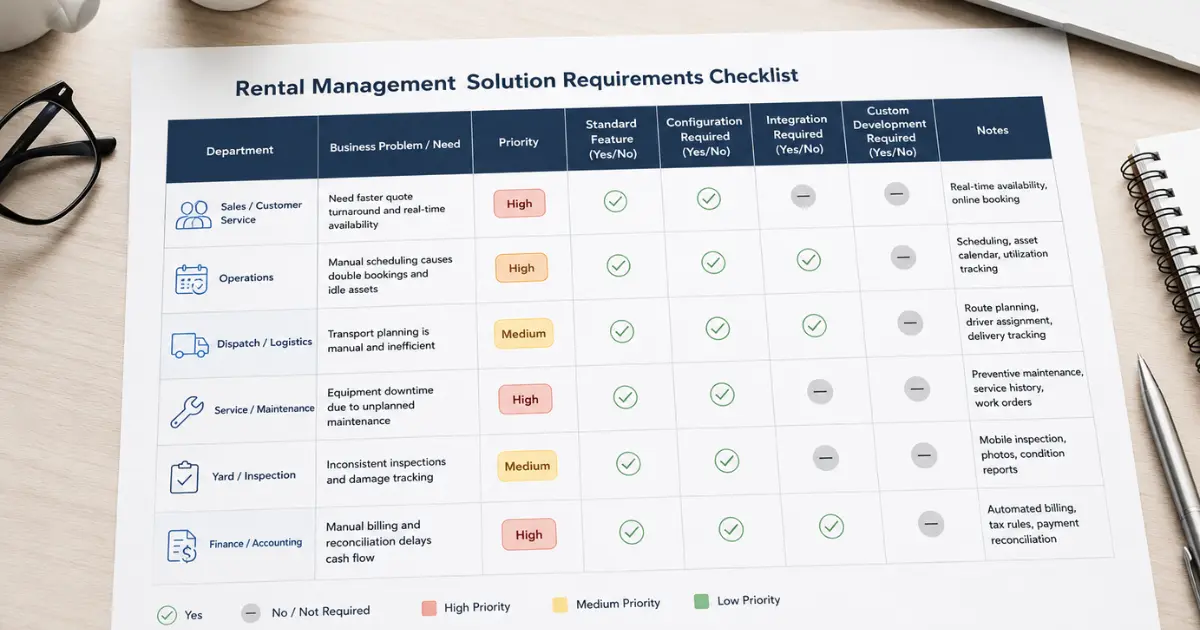
Separate Essential Requirements from Preferences
Not every request should be carried out with the same priority.
A multi-branch rental company may consider location-based availability essential. A smaller company may view it as a future requirement.
Group requirements into three categories:
- Required: The business cannot operate properly without it.
- Configurable: The requirement can be handled through settings, fields, workflows, permissions, or reports.
- Future: The requirement may be needed after the first phase is working.
This keeps the selection process focused and reduces the risk of paying for custom work that provides little day-to-day value.
Check Whether the Platform Supports the Complete Rental Lifecycle
A rental management platform should cover more than inventory and invoices.
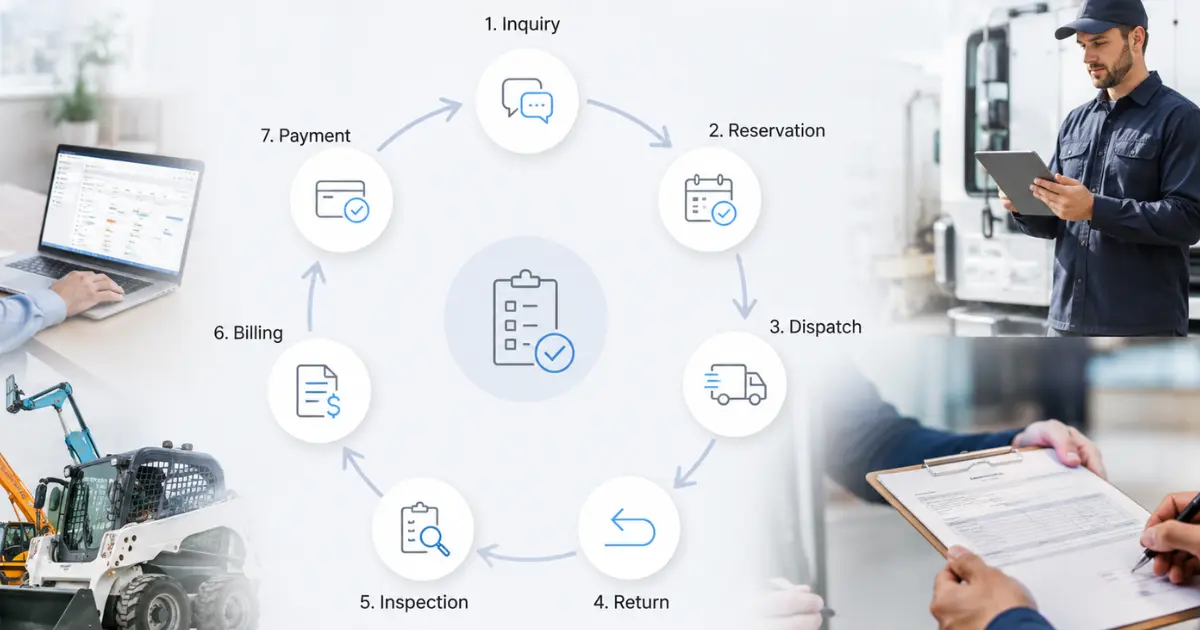
It should connect each stage of the rental process:
- Lead → Opportunity → Quote → Reservation → Contract → Equipment Allocation → Dispatch → Active Rental → Return or Exchange → Inspection → Invoice → Payment
When one stage is missing, staff usually fill the gap with spreadsheets, emails, or another application.
Evaluate Lead, Opportunity, Quote, and Reservation Management
Some rental businesses begin with a sales opportunity. Others create a reservation immediately when a regular customer calls. The rental management solution should support the process that fits each situation.
A sales-led process is useful when a customer is planning a future project and has not yet confirmed the rental. The team may need to record equipment requirements, estimated dates, project value, decision timing, quotations, and follow-up activity.
A direct reservation is more suitable when an existing customer needs equipment immediately.
During the demonstration, ask the vendor to show both scenarios:
- A new prospect requesting a quote for a future project
- A regular customer making a direct booking
The platform should not force every customer through unnecessary sales stages.
Confirm That Several Assets Can Be Managed Under One Contract
Many rental orders contain several assets.
A construction customer may rent an excavator, trailer, breaker attachment, generator, and safety barriers under one agreement.
The rental management platform should keep these items under the same contract while retaining separate dates, rates, locations, asset records, and return statuses.
Ask how the solution handles different rental dates within one contract, serialized and quantity-based inventory, early returns, equipment exchanges, and selected extensions.
Returning one asset should not close the entire contract.
Test a Complete Rental Scenario
Do not allow the demonstration to stop after a quote or reservation is created.
Ask the vendor to complete a realistic rental that includes an accepted quote, equipment allocation, delivery, rental extension, equipment exchange, partial return, inspection issue, additional charge, and final invoice.
This test reveals gaps that remain hidden when each feature is shown separately.
Review Real-Time Equipment Availability and Reservation Control
Equipment availability is one of the most important areas in rental operations.
A rental management solution may show that the company owns a machine without confirming whether it is ready for the requested dates.
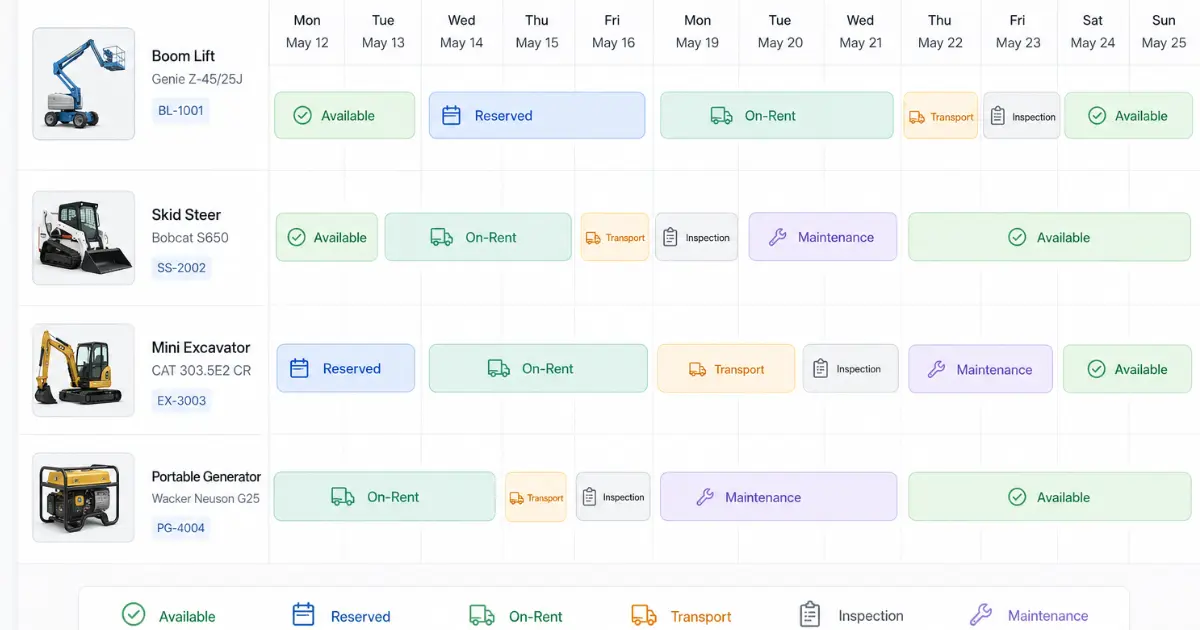
Check Equipment Statuses
A useful rental management platform should distinguish between several equipment conditions.
| Status | Meaning |
| Available | Inspected and ready to rent |
| Reserved | Committed to a future booking |
| On rent | Currently assigned to a customer |
| On hold | Temporarily blocked from booking |
| Awaiting inspection | Returned but not yet cleared |
| Under maintenance | Unavailable due to service work |
| In transit | Moving to a customer, branch, or workshop |
| Out of service | Removed from normal rental activity |
Ask whether a status change updates availability immediately.
When a machine fails a return inspection, it should no longer appear ready for the next booking.
Check Booking Conflict Prevention
The platform should check more than current rental dates before confirming a booking.
Availability validation should consider future reservations, expected return times, maintenance holds, inspection periods, delivery timing, and location transfers.
Ask what happens when a current rental is extended into the next booking, two employees reserve the same unit, maintenance is scheduled during a confirmed rental, or a returned machine fails inspection.
The rental management solution should warn the user before the customer receives confirmation.
Review Calendar and Scheduling Views
A calendar should make reservations and equipment commitments easy to understand.
Useful filters may include branch, asset group, individual unit, customer, rental status, and maintenance status.
A calendar is especially valuable when staff need to see whether enough time has been left between rentals for pickup, inspection, cleaning, refueling, or service.
Evaluate Asset Groups, Categories, and Inventory Control
Rental inventory should be organized in a way that supports quick searches and detailed asset records.
Review the Asset Structure
A useful asset hierarchy may look like:
- Category → Subcategory → Asset group → Make → Model → Individual unit
For example:
- Earthmoving → Excavators → 20-ton excavators → Manufacturer → Model → Serial number
This allows sales staff to search by what the customer needs while service and operations teams manage the exact machine.
Check Specification Groups
Customers may request equipment by capacity or function rather than by model.
The rental management platform should allow searches based on weight, capacity, digging depth, lifting height, fuel type, output, dimensions, attachment compatibility, or power source.
This is useful when several models can meet the same customer requirement.
Confirm Serialized and Non-Serialized Inventory
High-value equipment usually requires an individual asset record containing its serial number, location, meter reading, maintenance history, current status, and financial value.
Smaller items may be tracked by quantity.
A rental order may contain both types. For example, one serialized generator may be rented with ten quantity-based cables.
The rental management solution should manage both without forcing every small item to have its own serial number.
Check Customer-Specific Pricing, Quotes, and Contracts
Rental pricing is rarely limited to one fixed daily rate. Rates may vary by customer, branch, rental duration, project, season, equipment category, or negotiated agreement.
Review Price List Management
The platform may need to support:
| Price type | Typical use |
| Standard price | Regular daily, weekly, or monthly rate |
| Corporate price | Agreed rate for a business account |
| Government price | Public-sector contract pricing |
| Customer-specific price | Negotiated terms for one customer |
| Promotional price | Time-limited rate |
| Location price | Different rate by branch or region |
| Usage price | Meter, mileage, or hour-based charge |
Ask which rate takes priority when several price rules apply. Sales staff should see the correct customer rate without searching through spreadsheets or contract documents.
Review Discounts and Approval Rules
The rental management solution should allow authorized users to apply discounts while protecting margin. A large discount may need manager approval. The platform should record who requested it, who approved it, and why it was offered.
This gives sales staff reasonable flexibility without losing pricing control.
Check Quote Templates and PDF Generation
Quotes should clearly show equipment details, rental dates, rates, delivery charges, taxes, deposits, payment terms, and rental conditions.
Ask whether the rental management platform can create branded PDFs, track quote revisions, record acceptance, and carry the approved information into the rental contract.
The employee should not need to enter the same pricing and equipment details again after the customer accepts.
Review Equipment Allocation, Transport, Returns, and Inspections
Reservation and equipment allocation are related, but they are not always the same step.
A customer may reserve an equipment group before the exact serialized unit is known. Operations may assign the specific machine closer to dispatch.
Evaluate Equipment Allocation Records
The rental management solution should distinguish between the requested asset group, reserved quantity, assigned serialized unit, and replacement or exchanged unit.
Each allocation should have its own record so the company knows exactly which asset was delivered.
Check Pickup, Delivery, and Transport Tickets
Delivery information should remain tied to the rental contract.
The transport record may need to include the job site, contact person, delivery window, driver, vehicle, equipment dimensions, pickup date, and special instructions.
Ask whether the platform can create separate tickets for initial delivery, customer pickup, equipment exchange, partial return, final collection, and branch transfer.
Review Pre-Rental and Post-Rental Inspections
Pre-rental inspections document the equipment’s condition before dispatch. Post-rental inspections record condition, fuel, meter readings, missing items, and possible damage after return.
A good inspection process should support equipment-specific checklists, required fields, photos, notes, employee names, and pass-or-fail results.
When a machine fails inspection, its rental status should change and a service task should be created where necessary.
Confirm Equipment Exchanges and Partial Returns
The rental management platform should support replacing one machine during an active rental without losing the history of the original unit.
It should also allow individual assets to be returned while the rest of the contract remains active.
Charges should be calculated according to the actual rental period of each item.
Check Meter, Odometer, and Hour Readings
Usage readings may affect both billing and maintenance. The rental management solution should capture readings at dispatch, return, inspection, and service.
Ask what happens when a reading appears lower than the previous record or when usage exceeds the allowance included in the rental rate.
The same reading should not need to be entered separately for billing and maintenance.
Review Rental Invoicing and Additional Charges
Different contracts may require different billing methods.
Short rentals may be invoiced after return. Long-term rentals may be billed weekly, every 28 days, monthly, or according to a custom agreement.
Check Manual and Automatic Invoicing
The rental management platform should support scheduled invoice creation as well as manual review.
Automatic billing is useful for regular long-term contracts, while manual invoicing may be needed when damage, fuel, or disputed charges require review.
Review Additional Rental Charges
The billing process may need to include delivery, pickup, fuel, meter usage, cleaning, damage, insurance, service work, late returns, environmental charges, taxes, and discounts.
The rental management solution should show where each charge came from and which asset or contract line it relates to.
Confirm Invoice Adjustments and Credits
Ask how the platform handles billing corrections. Employees may need to issue a credit, revise a charge, adjust a rental period, or correct an invoice after customer review.
The audit history should preserve the original amount and the reason for the adjustment.
Check Asset Revenue,Utilization, and Profitability Tracking
Revenue alone does not show whether an asset is performing well.
A machine may earn strong rental income while also carrying high maintenance, transport, and downtime costs.
The rental management platform should help management compare:
| Performance Area | What It Shows |
|---|---|
| Rental revenue | Income earned by the asset |
| Rental days | Number of days on rent |
| Time utilization | Share of available time spent on rent |
| Financial utilization | Revenue compared with original equipment cost |
| Maintenance expense | Cost required to keep the asset active |
| Downtime | Earning time lost to service or repair |
| Current asset value | Remaining recorded or estimated value |
| Profit contribution | Revenue after directly assigned costs |
Ask whether these measures can be reviewed by branch, category, asset group, make, model, and individual unit.
Review Preventive Maintenance and Service Management
Rental availability depends on equipment condition as much as it depends on reservation dates.
Maintenance should therefore be part of the rental management solution evaluation.
Check Preventive Maintenance Rules
Maintenance may need to be scheduled by calendar date, operating hours, mileage, meter reading, usage cycle, inspection result, or manufacturer requirement.
The maintenance schedule should also consider future reservations.
When a machine is approaching its service limit, the rental team should know before assigning it to a long contract.
Review Maintenance Alerts
The rental management platform should show who is responsible for each service task. A warning that appears on a dashboard but has no owner may be ignored.
Useful alert information includes the due date, meter reading, assigned employee, work-order status, expected completion date, overdue period, and reservations at risk.
Evaluate Internal and External Service Tickets
Some repairs are handled by company technicians. Others are sent to a dealer or outside workshop. The rental management solution should support both.
Internal work may include technician time and parts. External service may also require a vendor, quotation, purchase order, warranty reference, and supplier invoice.
All work should remain attached to the individual asset history.
Review Vendor Management, Purchasing, and Receiving
Rental companies may purchase equipment, attachments, parts, outside services, or rerent inventory.
The rental management platform should connect these purchases with asset and rental records where appropriate.
Check Purchase Requisitions and Approvals
A purchase request should state what is needed, why it is needed, the estimated cost, required date, and location. Approval paths may vary by amount, branch, asset category, or expense type. The platform should record the request, decision, date, comments, and changes.
Evaluate Purchase Orders and Receiving
Ask whether approved requisitions can become purchase orders without repeated data entry. The rental management solution should support full and partial receipts. When a supplier delivers the main machine today and the attachments next week, the order should remain open for the outstanding items.
Review Rerent Procurement
Rerent equipment should remain tied to the customer rental. The business needs to track supplier rental dates, customer dates, vendor rates, customer prices, extensions, returns, transport, and expected margin.
A customer extension may also require a supplier extension, so these records should not be managed only through email.
Review Customer, Contact, and Communication Management
A customer account may contain several contacts. The billing contact may be different from the site contact, project manager, contract approver, or equipment operator.
The rental management platform should store these roles without creating duplicate customer accounts. A useful customer record should provide access to quotes, reservations, contracts, invoices, communications, job sites, open issues, and rental history.
Check Email and Outlook Connectivity
Ask whether employees can send and track emails from customer, quote, opportunity, or contract records. This is useful when price changes, delivery instructions, or rental extensions need to be reviewed later.
Evaluate Website and Customer Portal Connections
Some rental companies want customers to request quotes, view equipment, approve documents, sign contracts, upload files, or make payments online. Clarify whether an online booking creates a confirmed reservation or a request that staff must approve. This distinction matters when availability, pricing, transport, or credit limits require review.
Review Accounting, Payment, GPS, and Other Integrations
A rental contract affects customer balances, revenue, tax, purchases, assets, inventory, and general ledger records. Ask the vendor to explain exactly how data moves between the rental management solution and the company’s other applications.
Check Dynamics 365 Business Central Connectivity
Where Microsoft Dynamics 365 Business Central is used, review the flow of customer and vendor records, purchase orders, assets, inventory, rental invoices, vendor invoices, payments, fixed assets, general ledger entries, and financial dimensions. The vendor should demonstrate the data flow rather than simply state that an integration exists.
Evaluate QuickBooks and Other Financial Connections
For QuickBooks or another accounting application, ask which records move in each direction, how often they update, and how errors are handled.
A scheduled file export is different from a direct connection. Either may be acceptable, but the method should be understood before purchase.
Review Other Required Connections
Depending on the business, other integrations may include payment gateways, GPS, telematics, electronic signatures, website forms, marketing platforms, tax applications, or document storage.
Confirm whether each connection is standard, separately licensed, configured, or custom-developed.
Check Data Import, Export, and Migration Support
Most rental businesses already have years of customer, asset, pricing, maintenance, and contract information. Ask what can be imported through Excel and what requires a separate migration process.
| Data type | Migration decision |
| Customers and contacts | Active accounts only or full history |
| Assets | Serial numbers, status, location, and current values |
| Price lists | Current rates and customer agreements |
| Rental contracts | Open orders and selected history |
| Maintenance | Open work and historical service records |
| Finance | Open balances or detailed transactions |
| Documents | Contracts, certificates, warranties, and manuals |
A test migration should be completed before the final move. Do not wait until launch week to find missing asset numbers, duplicate customers, or inconsistent price lists.
Evaluate Reports and Business Intelligence
Reporting should help managers identify a problem and decide what action to take.
A large report library is not useful when reports are difficult to understand or require manual spreadsheet work.
Check Rental Performance Metrics
Useful measures may include:
| Metric | What it explains |
| Time utilization | How often equipment is rented |
| Financial utilization | Revenue compared with original equipment cost |
| Original equipment cost | Capital invested in the fleet |
| Capital expenditure | Spending on equipment additions and replacement |
| Return on invested capital | Return compared with capital committed |
| Fleet age | Age profile and replacement exposure |
| Rent-ready percentage | Share of the fleet ready for immediate rental |
| Rental days | Volume of rental activity |
| Downtime | Earning time lost to repair or service |
| Maintenance cost | Expense required to keep assets active |
Ask the vendor to explain how each figure is calculated.
Two rental management platforms may use the same metric name but apply different formulas.
Review Reporting by Branch and Asset Level
Reports should allow managers to move from a company summary to branch, category, asset group, make, model, and individual unit.
For example, low fleet utilization may be caused by one branch or one equipment category rather than the entire business. The report should make that difference visible without requiring a new spreadsheet.
Check Cloud Access, Security, and User Permissions
Deployment affects access, IT workload, security responsibility, and future platform updates.
Review Access Across Devices
A cloud rental management platform should work through supported browsers and devices without requiring employees to remain at one office computer.
Ask the vendor to demonstrate the solution on a desktop, tablet, and mobile device.
A page may technically open on a phone while still being difficult to use in the yard or workshop.
The guide to cloud rental platform benefits compares cloud and on-premises options across access, infrastructure, maintenance responsibility, and cost.
Check Role-Based Security
Access should reflect each employee’s responsibilities. Sales may need customers, quotes, and availability without access to vendor banking details. Technicians may need inspections and service records without access to customer credit information.
Ask about user roles, permissions, authentication, audit history, backups, access removal, sensitive fields, and test environments.
Review Configuration Before Requesting Custom Development
Rental businesses may use different terminology, approvals, pricing methods, and operating stages. The rental management solution should allow reasonable changes through configuration.
This may include status values, forms, fields, price rules, approval paths, permissions, notifications, reports, and document templates. Custom development may still be needed for unusual processes or integrations.
Every requirement should be classified clearly.
| Classification | Meaning |
| Standard | Included in the regular platform |
| Configurable | Handled through settings or setup |
| Integration | Requires a connection with another application |
| Custom-built | Requires new development |
| Not supported | Cannot be delivered in the proposed scope |
A key aspect of this is rental platform vendor evaluation which shows why configuration, integrations, support, pricing, and future requirements should be reviewed before signing.
Conclusion
Selecting the best rental management solution is not about choosing the platform with the longest list of functions. It must fit the way employees sell, reserve, allocate, dispatch, inspect, service, return, invoice, and report on rental equipment.
Start with your business requirements. Test complete rental scenarios. Confirm how availability, maintenance, pricing, billing, procurement, accounting, and reporting records work together. Pay close attention to areas that are often left until late in the buying process, including data migration, permissions, custom work, training, support, and total cost.
A suitable rental management platform should give each department the information it needs while maintaining one reliable history for every customer, contract, and asset.
Looking for a modern rental management solution? Book a free demo or email us at sales@prexa365.com to explore how we can help automate operations, improve asset utilization, and accelerate business growth.
Frequently Asked Questions
What is a rental management solution?
A rental management solution is used to manage customer inquiries, quotes, reservations, contracts, equipment availability, dispatch, returns, inspections, maintenance, billing, and reporting. It may also connect with accounting, procurement, payment, CRM, telematics, and electronic-signature applications.
What should I check before buying a rental management platform?
Start with your full rental process rather than a general feature list. Check whether the platform supports your asset types, branches, pricing rules, maintenance methods, billing cycles, integrations, reporting needs, security roles, and data migration requirements.
How should rental management solution vendors be compared?
Give each vendor the same written requirements and demonstration scenarios. Compare standard features, configuration, custom work, integrations, implementation, migration, training, support, security, and total cost over several years.
Should a rental management platform include CRM?
CRM is useful when rentals begin with leads, future projects, quotations, and follow-up activity. Companies handling mainly immediate counter rentals may use direct reservations more often, but customer, contact, and communication records are still important.
What is the difference between a rental management solution and an accounting platform?
A rental management solution handles operational activity such as reservations, equipment allocation, inspections, returns, exchanges, maintenance, and rental charges. An accounting platform manages customer balances, supplier invoices, payments, taxes, general ledger records, and financial statements. A connection between both reduces differences between operational and financial records.
Can a rental management platform prevent double bookings?
It can reduce double bookings by checking current rentals, future reservations, maintenance holds, equipment locations, and expected return dates before confirming an order. The availability rules must be set correctly, and staff must keep equipment statuses current.
Is a cloud rental management solution better than an on-premises platform?
A cloud platform usually supports access across branches and devices while reducing the need for local server management. An on-premises solution may suit organizations that need direct infrastructure control and have the internal IT resources to support it. The choice depends on security policy, access requirements, integrations, cost, and internal support capacity.
How much does a rental management platform cost?
Cost depends on users, modules, setup, migration, integrations, configuration, custom work, training, support, and third-party products. Compare the full three-year cost rather than only the monthly licence fee.
How long does rental platform implementation take?
The timeline depends on business complexity, data quality, branch count, integrations, custom requirements, testing, and employee availability. A written implementation plan should define responsibilities, decisions, migration, testing, training, and launch support before work begins.


